Ask Our Experts800-606-6969
Hello, Log InAccount & Orders

Holiday Headstart
Video Chat with a Lighting Expert - Live
Key Features
- 160W/s Output
- Lightweight Polycarbonate Design
- Accepts Softboxes Without Speed Ring
- 5/8" Stand Mount
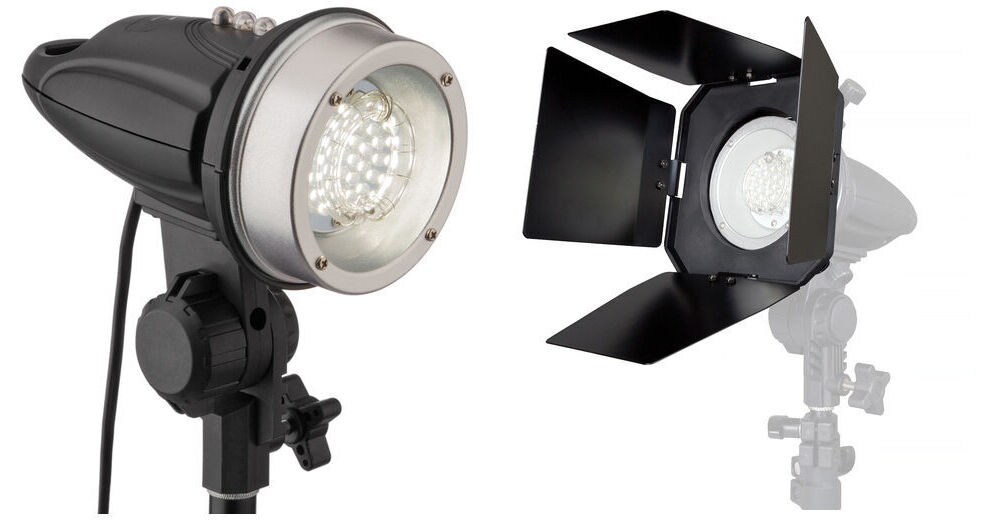
The Impact SF-ABRL Flash Head Kit offers a lightweight 160W/s stand mounted flash head with 2 key light modifiers for creative control.
More DetailsIn Stock
Protect Your Gear
Add a protection plan from $16.00
See Options
See any errors on this page?
question
Why am I not seeing any light in my photos? I see the flash trigger, I see the light on my subject, but the photos are not lit at all. Is there something I am doing wrong? The only light difference is when I turn on the modeling lamp.
I would first check to see that the flash is working by pressing the TEST button on the flash and see if the strobe fires. If the strobe is working, I would then check to see if the strobe fires when you press the shutter button (ensuring your camera's PC sync connection and the sync cable are operating). If that works, then I would next recommend checking your exposure, ensuring you are shooting in Manual mode and setting your aperture and shutter independently. Ensure that the shutter speed is at or below your camera's maximum flash sync speed (check your camera's instruction manual or the Specifications tab on our website for your camera model - it was not listed above in your inquiry), and your flash is close enough to your subject. Using a handheld strobe meter to ensure your exposure is set correctly would be beneficial, as using a shutter speed that is too fast to capture the flash or an ISO setting that is too low to capture the flash based on its distance may cause the light not to be seen in the photos. If all of these are okay, I would then recommend contacting Impact Studio Lighting directly to inquire if they have any recommendations for your equipment, or if the equipment needs to be sent in for inspection or repair. You may contact Impact Studio Lighting either by calling them directly at (212) 594-2120 or by e-mailing them at [email protected] with your inquiry.
Date published: 2018-08-28
How many settings are there to reduce the light ...
How many settings are there to reduce the light output? Thanks!
The fixture has a three position switch. High, low, and off.
Date published: 2019-04-04
Hi there. What are the specs for replacement ...
Hi there. What are the specs for replacement bulb? I would like to buy also replacement bulbs to have as a backup in the future. thank you
The flash tube for the Impact SF-ABRL160 Stand Mount Flash with LED Modeling Light is not user replaceable.
Date published: 2019-06-18
I am having trouble getting this Impact ...
I am having trouble getting this Impact SF-ABRL-160 to flash with my Canon 4000D. I have the cable and the PC adapter on the hot shoe. I can't get the camera to recognize the external flash. What else do i need?
The camera should be set to manual exposure mode and the sync cord/adapter connection should be checked to make sure they are secure.
Date published: 2019-08-06
How to put in half power and full power dose not ...
How to put in half power and full power dose not show in instruction
On the Impact SF-ABRL160 Stand Mount Flash with LED Modeling Light BH #IMSFABRL160 you can switch the power level with the black switch.
Date published: 2023-05-01
question
What do the I & II markers mean?
The 'I' marker refers to the light being set at full power while the 'II' marker refers to the light being set at half power.
Date published: 2018-08-28
question
Can this be used with pocket wizards?
You may use the PocketWizard PlusX 2 Pack B&H # WIPWPX2P, which includes a miniphone to miniphone cable to connect to the SF-ABRL160. An image is shown below.
Date published: 2018-08-28
question
Can this be used with a beauty dish? And if so, what would I need to put the dish on?
Unfortunately, this flash cannot accept a beauty dish.
Date published: 2018-08-28