When it comes to putting on a live show, knowing the specific gear to get and how to use it can be a daunting prospect. There are tons of different microphones, speaker systems, monitoring setups, and mixer environments, all of which are suited for different types of performance settings. And that's not even including power distribution, cabling, and other miscellaneous equipment you'll need to put on a proper event. But fear not reader. In this guide, we'll go over all the gear you'll want to consider and why, whether you're putting on a show in your basement or on the big stage.
DIY Setups – Home, Studio, or Backyard Shows
DIY show hosts can put on a great show with a modest setup: a PA system, microphones (with cables and stands), DI boxes, and a significant and safe power distribution system are more than enough to get the party started. If you're hosting bands, a modest but proper backline consisting of a drum kit (no cymbals) and a bass amp will save the musicians a lot of headaches. Having an extra speaker cabinet is a also a useful addition for guitarists with their own amp head.
Portable and active gear are your best bet. This type of gear simplifies the process and diminishes the cost of event production thanks to their integrated, all-in-one designs. Active gear can eliminate the need for external amp racks, matching power specifications, and excess cabling, and will make the setup and breakdown process WAY easier. Here's a rundown of the essentials with some of our recommendations thrown in as examples—but make sure bolster yourself with your own research as well!
Active/Powered PA Speakers
As the main connection point between the performer and the audience, speakers are something you're gonna want to get right. This will be the longest section in this guide. Powered/active speakers have their own built-in amplifiers meaning they require only a power source and audio input to function, making your life a lot easier.
Manufacturers will match the internal amplifiers and speaker drivers from the factory so you won't have to worry about power distribution nearly as much (although you will want your speakers to have the right amount of power for your purpose). They'll often include built-in digital signal processing (DSP) which can have EQ, frequency response settings, and even a simple mixer (and while that technically eliminates the need for an external mixing board, it may be in your best interest to include a mixer in your setup anyway).
Types of Speaker Drivers
The speaker driver is the actual part of the speaker that makes sound, converting electrical signals into vibrations that people can hear. Certain types of drivers are best suited for different ranges of frequencies:
- Subwoofer: 20-100 Hz
- Woofer: 100-2,000 Hz
- Midrange: 300-5,000 Hz
- Tweeter: 2000-20,000 Hz
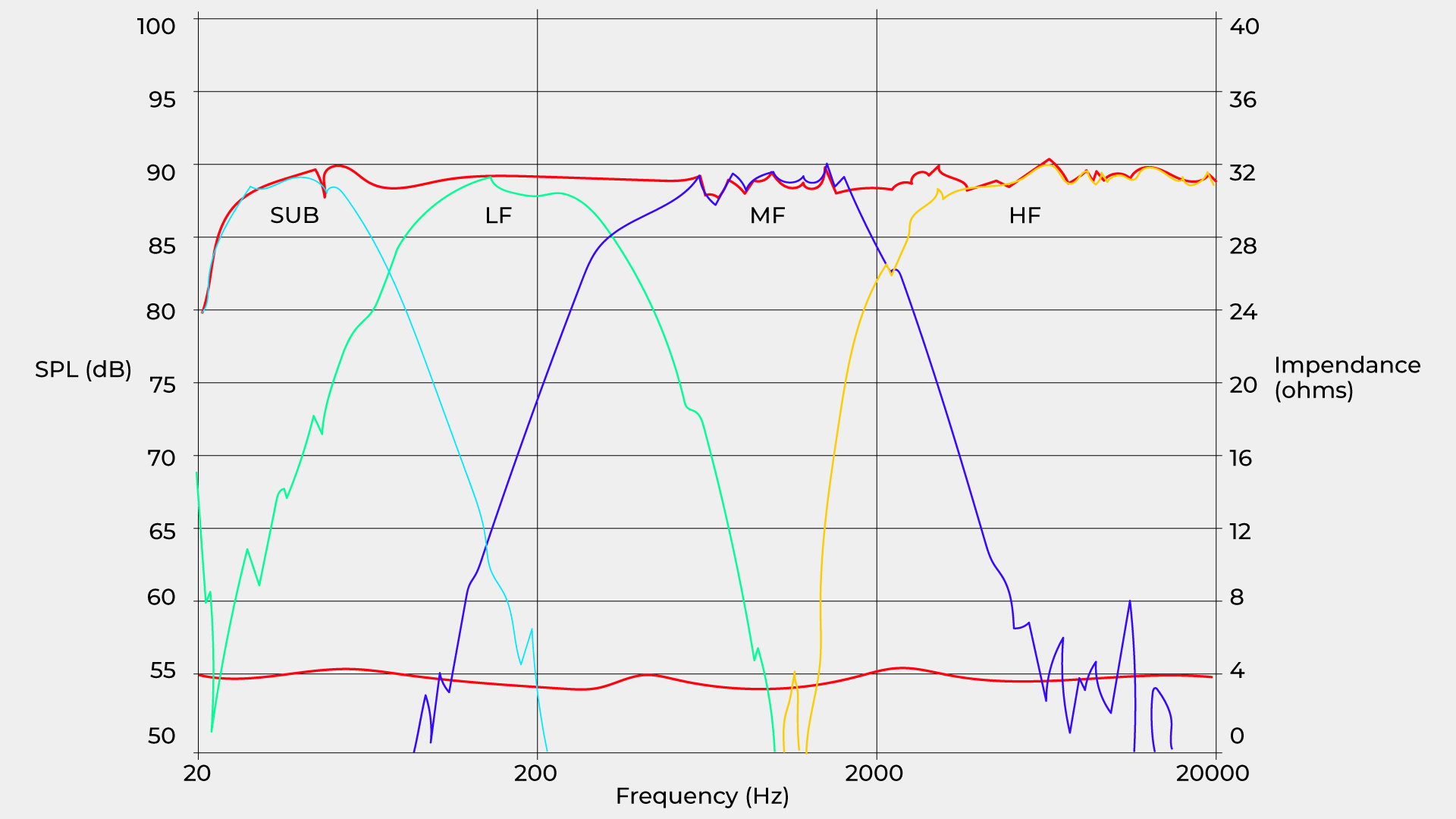
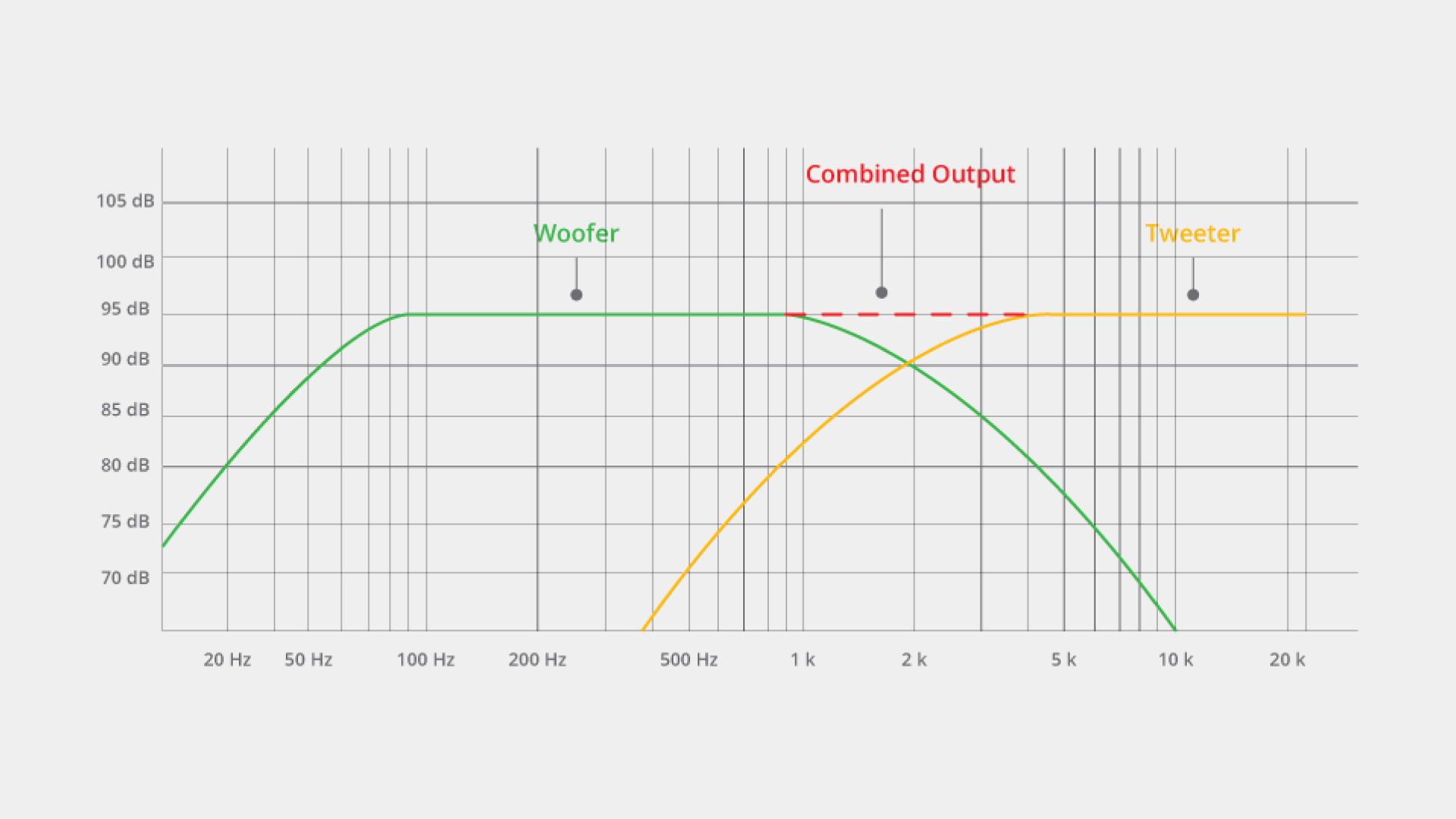
Most loudspeakers will have at least two drivers with a woofer and a tweeter (sometimes called the speaker horn). Some have three with a midrange driver, but subwoofers will typically be in their own cabinet going solo, sometimes having a connection point where you can attach a pole-mounted loudspeaker to make a tower sound system. For more information on speaker specs, check out our article on it here.

Power Up
When choosing a speaker or PA system, the amount of power (in watts) is an extremely important attribute to consider. It defines the volume, clarity, and headroom of your sound (for passive systems it's just as important). Too little power and loud sounds (like those of a rock band) will clip, crush, and distort before hitting the proper volume level. Too much and … well, the disadvantages of too much power are not as sonically tangible, but expect audible idle hiss and floor noise, less portability, and an emptier wallet. Here's what you need to know about power:
Peak Wattage
When looking at a speaker's name, it will often include large number followed by a W for watts. This almost always represents the peak or maximum power rating the speaker has. This is the absolute maximum power a speaker can handle in an instant, usually for only a fraction of a second. Be wary that pushing a speaker to or over its maximum limit over an extended period risks distortion and clipping, burning out voice coils, or even starting an electrical fire.

Companies use the peak power rating as a marketing tacticbigger number = more impressive thing. And while it's a good thing to keep in mind, there's a number we care about much more.
RMS (Root Mean Square)/Continuous Wattage
In the spec sheet, you'll find the RMS (root mean square)—or continuous power rating—which will reveal much more information about what the speaker can handle. This power rating aptly defines the amount of power a speaker can handle continuously without distortion or damage and will often be roughly ½ to ¼ of the peak rating.
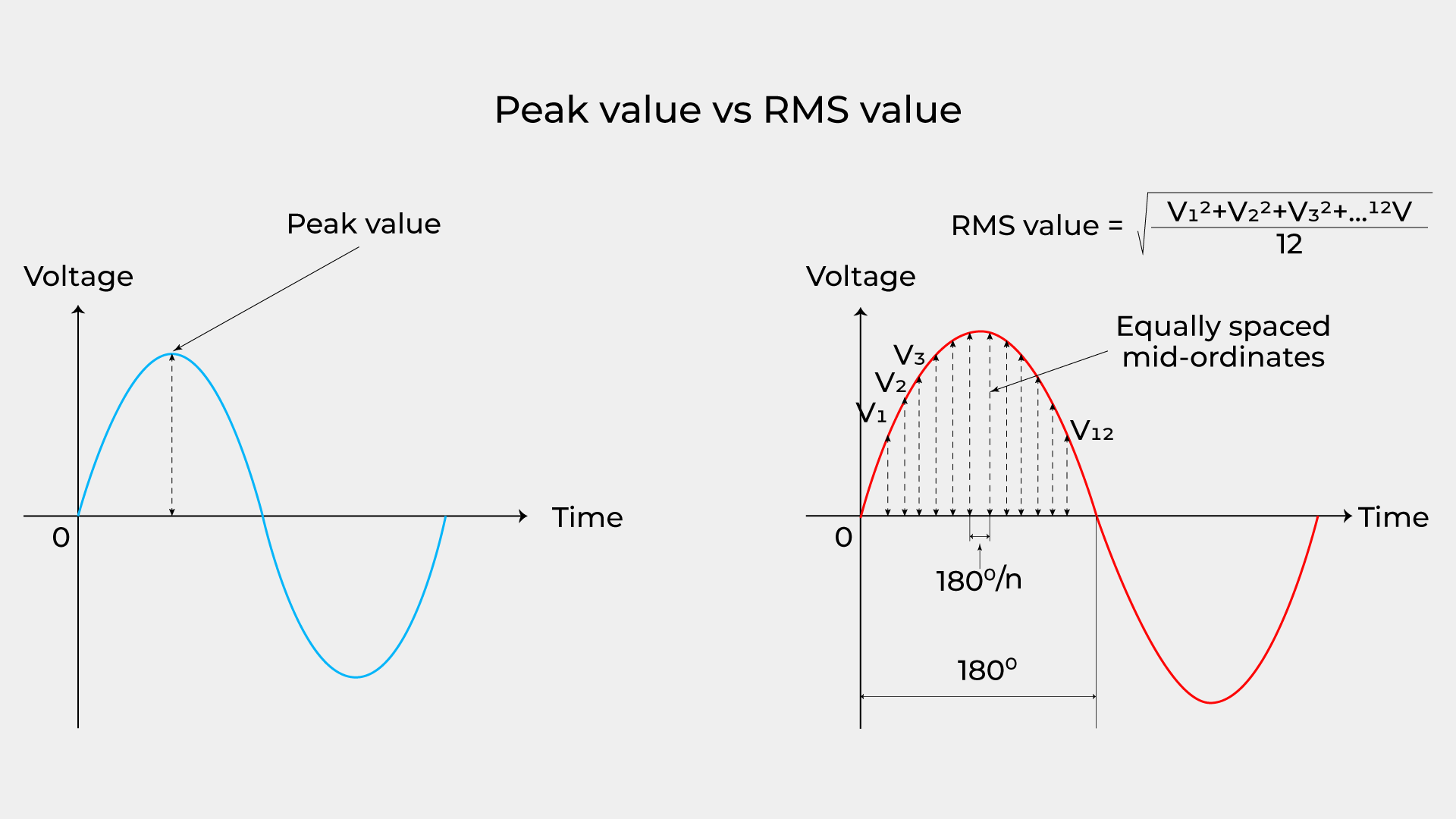
Sometimes, the listed power rating will be the sum of the power sent to both the woofer and the tweeter (nearly all PA systems have both built into it sitting behind the grille), or subwoofer and main speaker if it's a combo system or column array.
Here's some rough guidelines of the amount of power you'll want for different sized events:
- Small events (10-30 people) should have at least 50-150 watts RMS. Compact speakers should be sufficient, and adding subwoofers is probably overkill. This is appropriate for acoustic performances, speaking engagements, background music, and rehearsal spaces without drums.
- Medium Events (30-80 people) will want to be on the higher end of 150-500 watts RMS. Events that need this amount of power will probably want better bass support, so adding a subwoofer is recommended when playing recorded music or backing tracks. If it's part of a system that is just amplifying vocals, a sub is less necessary and can be deactivated or removed. Speakers at this power rating will have better and larger sound projection and are appropriate for small band gigs, wedding receptions, medium sized backyard/basement shows, and smaller performance spaces.
- Large Events (100+ people) will need at least 500W RMS and will probably want 1000+. Adding Subwoofers and more speakers is recommended at this level of power and is best for open and/or crowded spaces. 1000W+ is appropriate for medium sized rock gigs, DJs, house parties, and outdoor shows, but you can get by with less depending on the nature of the event.
True event spaces, venues, and stadiums use systems from 5000-25,000W, possibly even more. Note that indoor events will have louder perceived volume with the same amount of power because of sound reflections. For outdoor events, consider using multiple speakers with larger woofers and increasing the recommended wattage by 30% or more.
Point Source or Line/Column Array Loudspeakers?
Traditional or "point source" powered loudspeakers like the LD Systems ICOA Pro 15 A (rated at 1500W RMS) are best suited for louder acts like rock bands and bass-heavy DJs due to the loud volume and punch delivered by 8"-15" woofers, are easier to daisy chain for scalability, and are often more affordable. Some portable PA systems like the Bose S1 Pro+ (~100W RMS) have Bluetooth wireless connectivity and built-in DSP, making it extremely flexible and great for acoustic shows, speaking engagements, and anything that needs to be amplified but not-too-loud (it can still get plenty loud, but probably not enough to soar over a rock drummer).

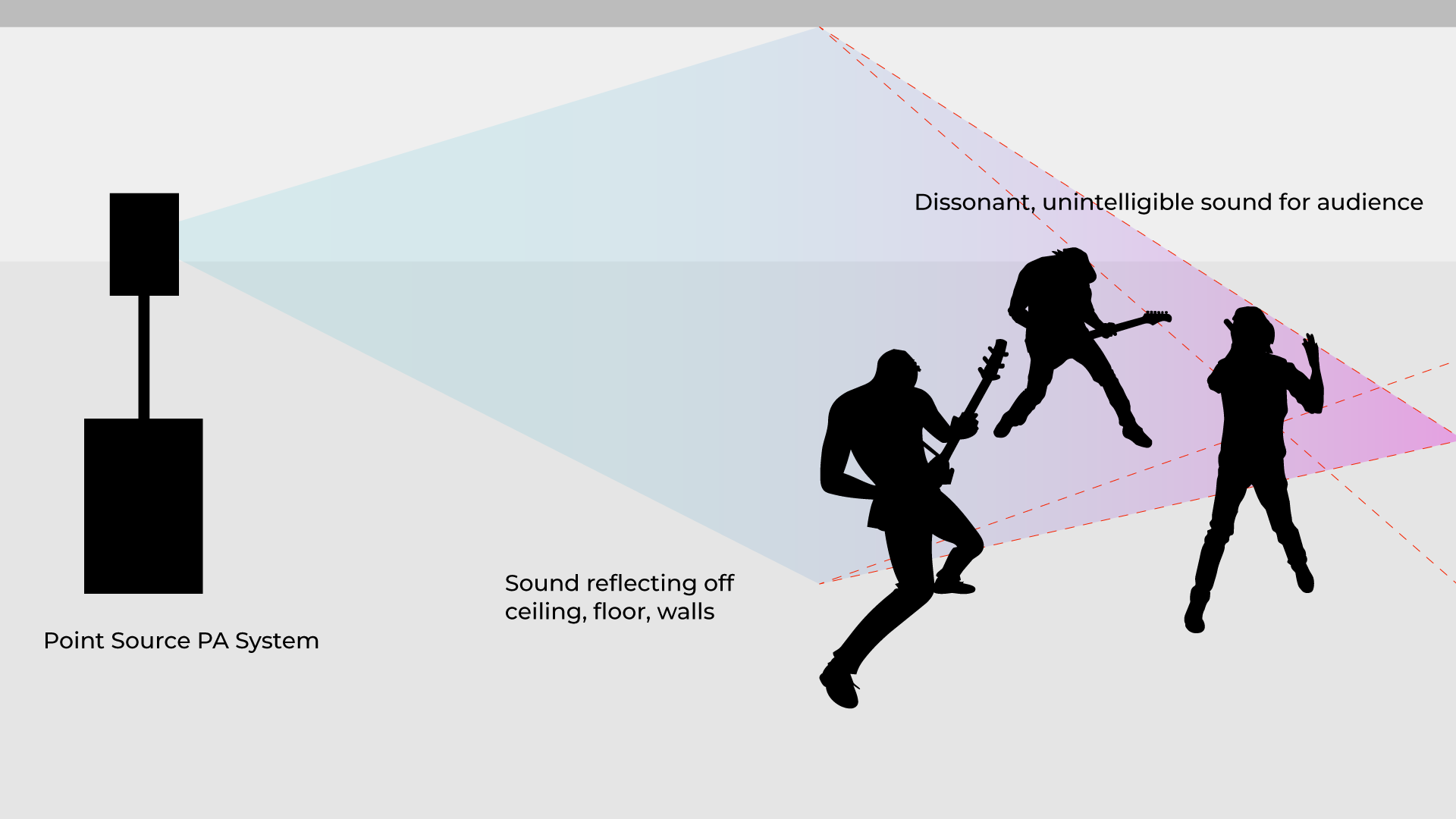
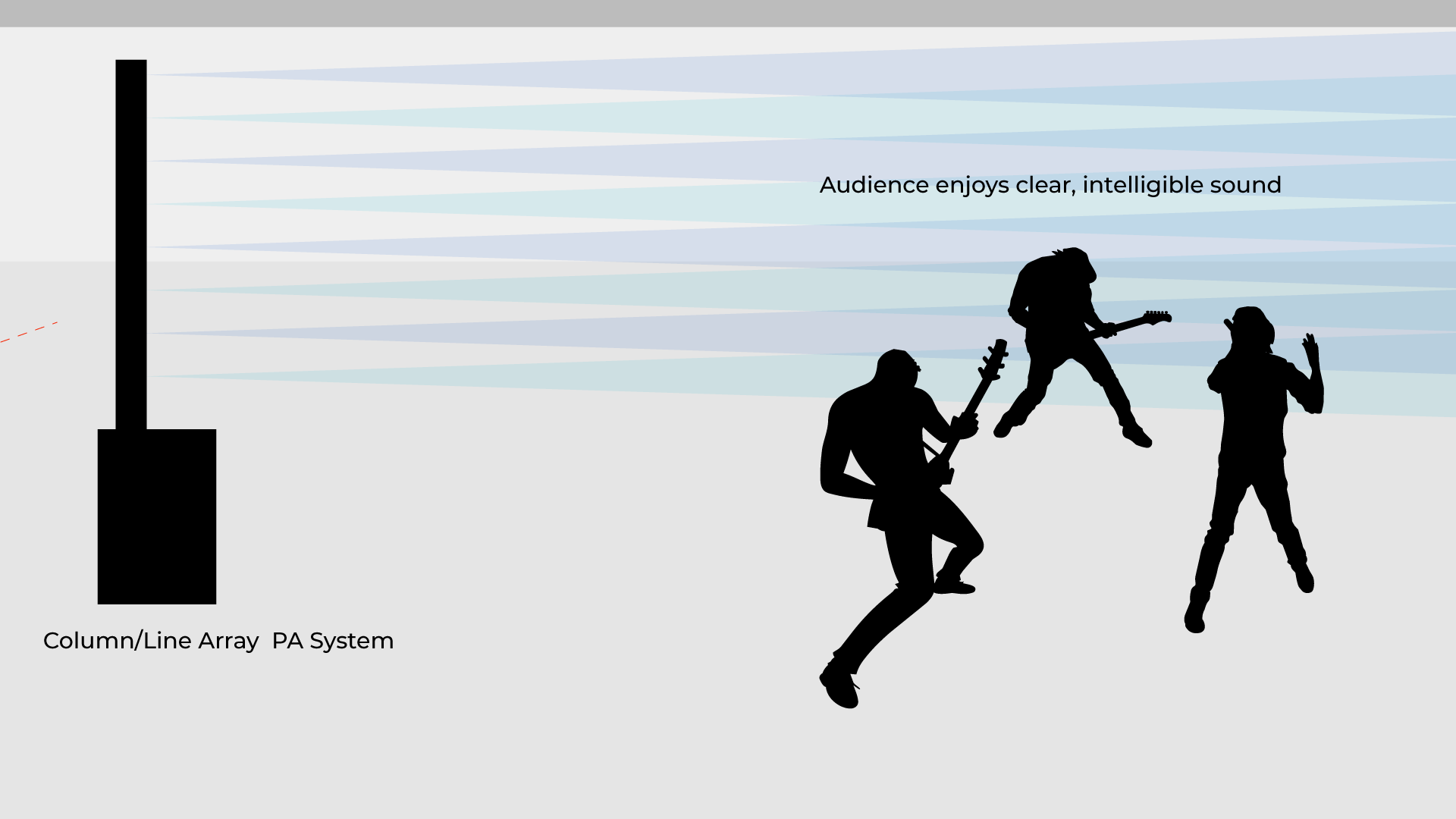
Column array systems like the LD Systems MAUI 28 G3 or QSC AcousticDesign Series are tall and slim enclosures that contain a number of vertically stacked small speaker drivers (often six or more) often paired with a single large subwoofer as the base. Unlike a point source speaker that pushes air from a woofer/tweeter pair, a column array uses all its drivers to create constructive interference, gaining some specific key advantages like:

- Wider horizontal and narrower vertical dispersion: column arrays often have 120 degrees of horizontal coverage and as little as 30 degrees vertical coverage, whereas point source is usually between 60-90 degrees horizontal and 40-60 degrees vertical. Column arrays are superior at covering a wider spread for an audience while negating reflections from the floor and ceiling of a room, creating a tighter and clearer sound.
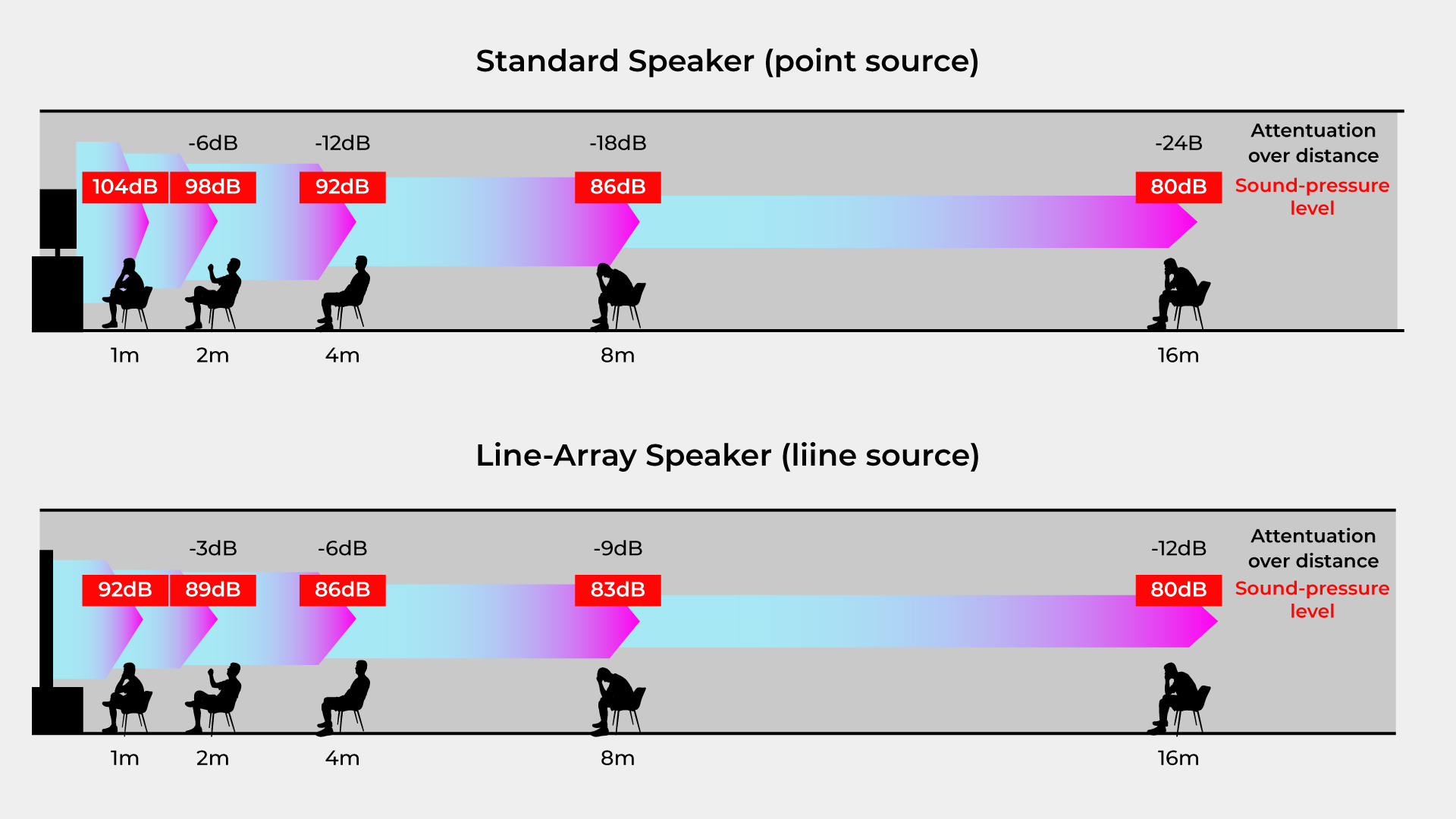
- Extended throw distance: One beneficial result of a column array systems' constructive interference is a better and more consistent volume drop off as you retreat from the speakers, losing only 3dB per doubling of distance (point source speakers lose 6dB per doubling). This ensures that the back of the crowd is getting a similar sonic experience as the front and can allow you to lower the overall level of the speakers while maintaining volume and quality for more of the audience.
- Less Feedback: The way sound disperses from a column array can allow performers to place the speaker behind them (depending on the type of performance), so it can act as a monitor for the performer and the loudspeakers for the audience simultaneously. While this isn't foolproof (array systems can still feedback at loud enough levels), this can save the money and space you would typically use for dedicated monitors.
A column array's main sonic disadvantage is a lack of low-mid punch, as its smaller 2"-3.5" drivers simply can't push the low-end air that an 8"-15" woofer can: drum snares, distorted guitars, and bass-heavy music will lose some thump. They are more expensive per watt, and scaling them up can cause issues, as two or more placed side by side will cause nasty interference issues (though it's difficult to think of a use-case where that would be beneficial in the first place).
In the end, both types of speakers can do the job. But to generalize, if you're throwing a basement rave or rock show where volume and low-end is crucial, use point source. If you're hosting a backyard wedding or speaking engagement where sound quality and intelligibility are key, a column array is the superior option.
The Mixer
When your speakers are all set up, you'll want to be able to control them, right? With a mixer, you'll be able to take care of all the levels on stage from the vocals to drums to the backing tracks, all able to be panned, EQ'd, and compressed to create the perfect mix or blend of sound between each performer on stage and the audience enjoying the show.
While using the built-in EQ and mixer on a powered speaker is perfectly fine for simple setups—busking, solo acts, and speaking engagements (anything that only needs one or two inputs)—a separate mixer with multiple inputs will give you the control, flexibility, and pro-level sound you'll need for larger acts. Dedicated mixers also have better preamps, signal processing, and built-in effects than those found on powered systems.

For an average live setup for a band, an 8-12 channel mixer like the Yamaha MG12XU, Zoom LiveTrak L6max, or Mackie ProFX10v3 should be plenty enough to get by. For more information such as number of inputs you'll need, whether to choose analog or digital, and more, check out our guide to mixers for beginners! The only thing to note: using unpowered speakers with an unpowered mixer means you'll need an external amplifier.

Monitoring System
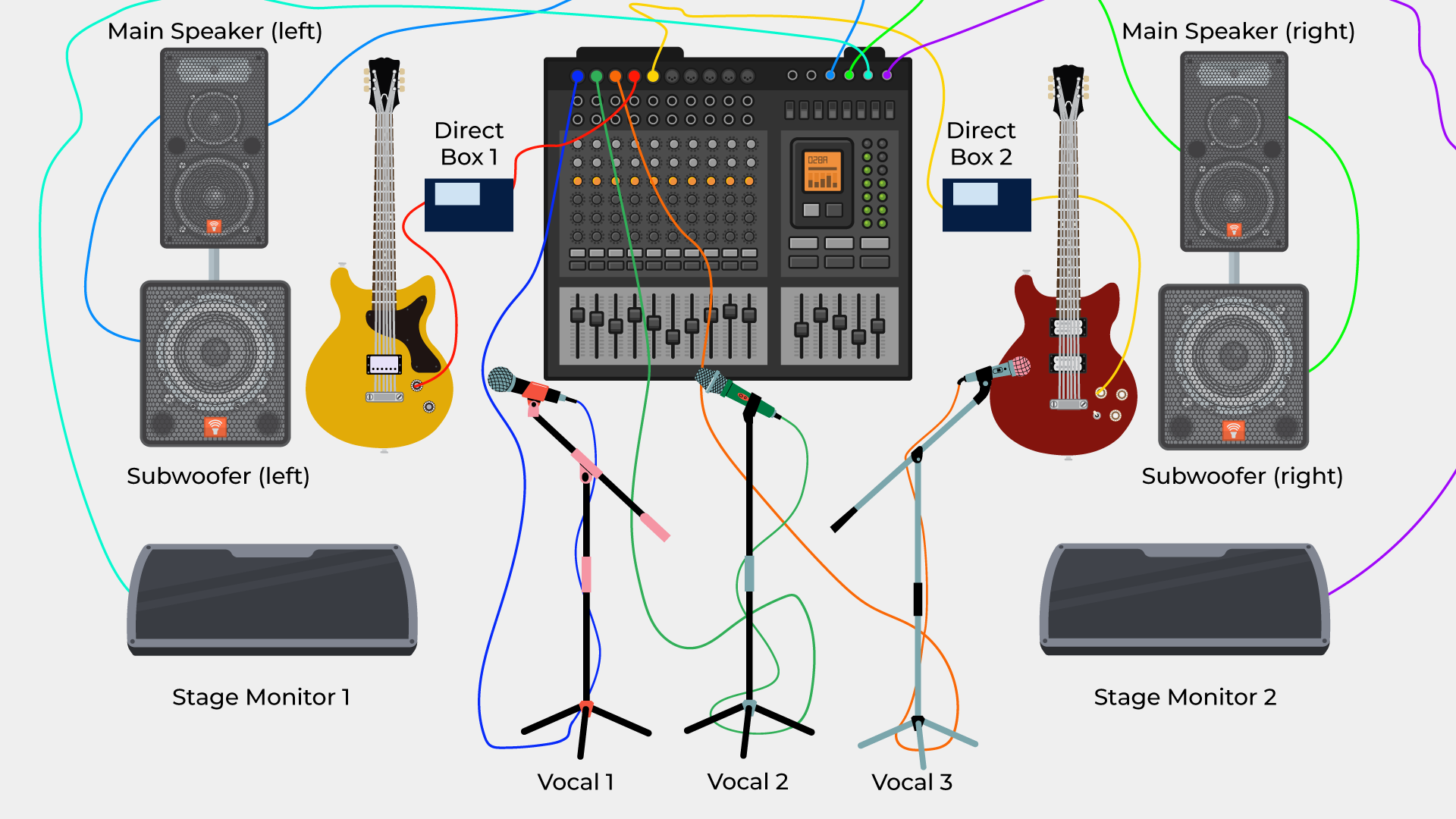
Stage monitors are on-stage speakers pointed towards the performers and away from the audience, allowing the performers to be able to hear themselves. PA systems are usually placed in front of the stage and away from the performers as to maximize volume levels for the audience and to prevent any feedback from microphones or instruments that are on the stage. Because performers are behind the PA system, they need a way to hear or "monitor" themselves, hence the name. They usually come in the form of wedges and abide by the same active/passive and power rating attributes that any speaker would have. In reality, any speaker can be used as a monitor (array systems can potentially mitigate this, but wedges are still the superior monitoring option).
With one monitor, you can put it right in front and center of the stage for maximum coverage, but at least two are preferable as they will cover the left and right of the stage. Venues will often have one more monitor in the back by the drumkit, since it seems drummers need their own (in their defense, it gets really loud back there!), so scale out your event accordingly.
Great options include the LD Systems MON 8 A G3 or the classic Yamaha BR15M. Professionals and those playing in large venues will often prefer personal or in-ear monitors; check out part 2 for more information.

DI Boxes and Backline
The backline is key to supporting any act or band in a show. A bass amplifier and drum kit (with hardware) are standard for most serious venues. Luckily you don't have to source cymbals as drummers typically prefer their own, and guitarists often like to bring their own amps (or at least amp heads—a decent speaker cabinet to connect their amp head to is a welcome bonus).
If you can't provide that equipment, everything can be hooked up directly to the PA system via DI boxes (Direct Injection or Direct interface) like the ever handy Radial Engineering ProDI. These boxes bring microphone and hi-z level sources (most often guitars and basses) to mic level so they can be sent to a mixer or made audible through an active PA system's built-in amplifier.

Laptops, synthesizers, and other input sources that are already at line level can connect directly to an active PA system or mixer, but for longer distances, the DI box can be used to convert unbalanced signal to balanced XLR signal for use directly with the mixer, which will reduce noise and allow those instruments to be used comfortably onstage. They come in both active and passive variants—check out our guide to learn more about the specifics of DI boxes.

Mics and Stands
Live performers, whether musicians, vocalists, or speakers, will usually turn to dynamic microphones for durability, drop resistance, and ability to handle extreme loudness. For vocalists, the quintessential Shure SM58 is the go-to for all venues, but there are alternatives and fancier options like the Telefunken M80 and Beyerdynamic TG V70d. Shure SM57s will often be used to mic amplifiers or acoustic instruments, and there are a bevy of options for drum micing, from the clip-on Beyerdynamic TG D35 for snares and toms to the AKG D112 MKII for kicks. It really comes down to your budget and preference, but the Shure SM57 and SM58 will take you the distance for around $100 a pop!

Wireless microphones well … lose the wire, which allows vocalists and performers to run around stage or join in with the audience. While this is convenient and can be a lot of fun, you'll be trading off some reliability – you'll have to worry about keeping the batteries charged, signal interferences, and frequency issues, not to mention a higher price tag. However, most modern wireless systems will have very few issues, so just think about what you need for your setup.
For speaking engagements or vocal-centric performances, a wireless microphone might be the deal, but micing instruments and amplifiers is usually done with traditional wired mics. You can use traditional wireless systems like the Shure BLX24R/SM58 or the LD Systems U3051 HHD or bodypack/headset systems like the LD Systems U505 BPH or DPA 4088 for a more "TED Talk" vibe.

A decent selection of mic stands, and other hardware should be provided. These things shouldn't be hard to acquire and are often able to be thrifted or offered for free or for very little by studios and venues looking to get rid of old hardware. Getting new stock is always an option as well! Here's some of the basics you should consider:
- Straight round-bottom mic stand(s) (for vocals)
- Boom arm tripod-bottom mic stands (for drum overheads, raised amps, and other stage micing)
- A short tripod mic stand for kicks and floor amps
- Drum hardware (cymbal stand, floor tom legs, etc.)
- Keyboard stand(s)
- Guitar stand(s)
- Laptop stand(s)
- Universal Mic Clips
Miscellaneous
Besides the essentials, things like gaff and masking tape, sharpie markers, dollies, hand carts, etc. will be useful tools to have on hand for setup, breakdown, and transitions. Anything that can help to organize, expedite, and simplify the process will make your life and the life of the performers easier and is highly recommended.
If you don't have a naturally visible area for a stage and want that professional risen atmosphere, there are portable stages that can interlock with accessories and cases, like the ProX StageOne Portable Stage and MyStage Portable Stage.

