Video
- Recently Added
- Popularity
- Name
About 299 filtered results

Posted
Now that you've filmed your video, it's time for editing and delivery in HDR. Doug dives deeper into HDR formats, as well as standards and workflows when working with HDR video. Join him in DaVinci Resolve where you'll learn about both the technical and creative sides.
0:00 - Intro
1:03 - Choosing an HDR Monitor
5:08 - Color Gamut
6:44 - Setting Up Your Monitor & Project
10:39 - Grading in HDR
24:28 - Exporting & Delivering
25:32 - Final Thoughts
Sponsored by

by Jennifer Hahn · Posted
Point-and-shoot cameras are a great value-add to your photography kit, social media sharing, or as a vacation companion for quick stills and capturing memories on the fly. And these days, the value is even greater with point-and-shoot video recording. The point-and-shoot design makes things simple to change to video mode and press record. Though after you’ve captured your video, it can become cumbersome to edit and share that footage.
Some cameras allow you to edit/trim your video footage (also called “Movies” in some cameras) in camera, which
Posted
In part one, Doug shares how you can introduce HDR into your workflow. He discusses the advantages and disadvantages of shooting HDR video, the basics of HDR formats, and monitoring HDR on set.
0:00 - Intro
0:59 - What Is HDR Video?
2:20 - HDR Format Basics
5:30 - Middle Gray
7:19 - HDR Monitoring
12:59 - A Note on Exposure
13:45 - Where Is 18% Gray in HDR?
14:26 - Final Thoughts

by Jennifer Hahn · Posted
Many moons ago, when the economy was unstable and layoffs were rampant, this author decided to switch careers to pursue filmmaking. With a new perspective and energy, but without any guidance, knowledge, or tools, going back to school for digital filmmaking was a no-brainer. The aim was to tell real stories in documentary form, and it became a challenging but ultimately rewarding adventure.
Tips for Starting Out
If you’re just starting out at the dawn of your student career, or find yourself older and wiser looking for a change, and you want

by Steven Esposito · Posted
Whether you are learning the craft of cinematic filming, content creation, or even video editing, Professor Zack is here to get you started!

by Steven Gladstone · Posted
Learning to speak and use the language of lighting can go a long way to creating images that move the audience, immersing them even further. It will also make working on set much more efficient, helping you create more powerful images in less time with your crew.
This article will cover basic lighting types, so you can become familiar with what is available.

by Steven Gladstone · Posted
When creating images for a film, you try to balance your shots so that you draw the audience into the movie, while at the same time they forget that they are watching a movie. Usually, the last thing you want is to break the illusion and have the audience snap out of their reverie.
As you read this article, you may want to pause and rewatch some classic films, or films that had a powerful effect on you. Examining the new and different techniques, lighting, and compositions used to create impact, mood, and feeling will help you grow as a
Posted
Filmmaker Cooper O’Hearn and photographer Derek Fahsbender team up to break down filmmaking to its core, from pre-production and camera settings to storytelling, theory, color-grading and more.
0:00 - Intro
7:58 - Photography vs. Videography
10:59 - Frame rates & Shutter speed
17:29 - ND filters
19:18 - Aperture& ISO
24:32 - White balance
26:17 - Peaking & zebras
29:49 - Audio
32:21 - Color Profiles
34:22 - Editing software
36:19 - File storage
42:23 - Types of shots
45:13 - Filming tips
by Zack Young · Posted
If you’re capturing a live event like a religious service, the best way to engage online viewers is by providing them with an even more dynamic view of the action than they could get in person. This is rarely achieved by throwing an iPhone on a tripod in the back of the room. Instead, we’ll show you how to use PTZ (pan tilt zoom) cameras to stream professional, high-quality versions of your events and services out to the general public. We’re breaking down the equipment, software, streaming services, and more.
Equipment Needs
On the most basic
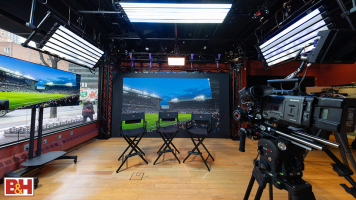
Virtual production (VP) is a filmmaking technique that combines live-action footage with digital imagery in real time. VP often happens on volume stages where interlocked LED panels display photo-real backdrops that change as the camera moves to create stunning in-camera virtual effects (ICVFX).
by Mary Latvis · Posted
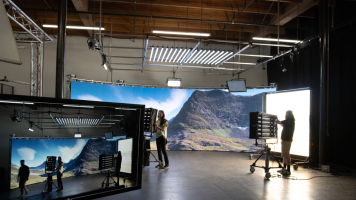
Getting ready to prep or shoot your latest video project? In addition to being the largest photography store in the USA, B&H Photo also incorporates The Studio alongside a state-of-the-art technology space, The Studio Technology Center (STC). The team focuses on providing complete professional video solutions while The Technology Center serves as an access hub to latest cinema and broadcast technology,
by Steven Gladstone · Posted
Lighting hasn't really changed in the past few decades. Sure, new fixtures, faster cameras and lenses, and shooting styles may change, but the essence of lighting really hasn't changed. The look of the scene is still driven by the DP and still created by the lighting designer; it is still all about ratios, and no matter how technology advances, lighting is a powerful tool for putting realism and drama on screen.
What Is Image-Based Lighting?
Simply put, image-based lighting (IBL) is using lighting fixtures to mimic the effects of natural
by Steven Gladstone · Posted
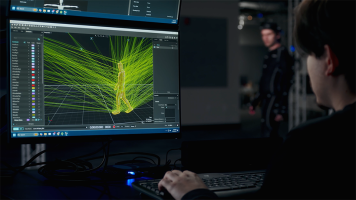
The goal of this article is to provide you with an introduction to motion capture, its uses and requirements. As with any journey, it begins with the first few steps.
Motion Capture (MOCAP)
MOCAP is the process of recording high-resolution movement of objects or people and capturing it into a computer system. It has numerous applications, including military, sports, medical, and, of course, for entertainment. While you could trace the roots of motion capture all the way back to the seminal motion capture experiments like Muybridge’s exposures
by Zack Young · Posted
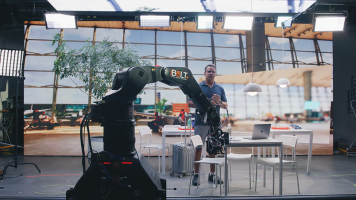
On-set virtual production (OSVP) is the real-time mixing of live-action footage with computer-generated imagery to create amazing in-camera visual effects (ICVFX). These days, most OSVP happens on a volume, a studio space with seamless LED panels (or cabinets, as they’re known in OSVP) grouped together to display rendered images that are then captured live in-camera alongside human talent. These cabinet configurations can be as simple as a flat backdrop stacked from the ground up, and as complicated as a full curved 360° wrap hung from trusses

by Zack Young · Posted
Virtual production (VP) is a professional video technique that combines live-action footage with computer-generated imagery (CGI) in real time. Virtual production typically happens on “volume” stages where seamless interlocked LED panels display rendered photo-real backdrops that change and adapt as the camera moves. This creates impressive in-camera virtual effects (ICVFX) that require little to no post-production work. Let’s jump into the exciting capabilities of