Computer Keyboards

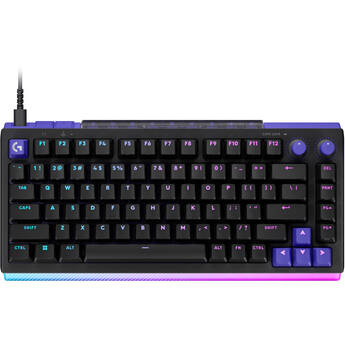
Logitech G512 X 75 Dual Swap Mechanical Keyboard (Linear Switches, Black)
- Wired USB-C Connection
- Linear Mechanical Switches
- LIGHTSYNC RGB Backlight
- 0.1 to 4.0mm Custom Actuation
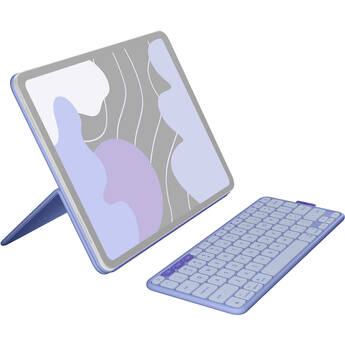
Logitech Flip Folio for 13" iPad Air/Pro (Lilac)
- For 13" iPad Air or iPad Pro
- Detachable Bluetooth Keyboard
- Front and Rear Protection
- Adjustable Viewing Angles
Microsoft Surface Pro Keyboard Cover with Pen Storage (Black, Brown Box Package)
- For Surface Pro, 8, 9 & 10
- Mechanical Keys | Copilot Key
- Glass Touchpad
- Windows Shortcut & Control Keys
AZIO Retro Classic BT Wireless Backlit Mechanical Keyboard (Elwood)
- Wired USB-C Connection
- Wireless Bluetooth 5.0 Connection
- Kailh Switches
- White LED Lighting
Logitech G PRO X TKL LIGHTSPEED Wireless RGB Gaming Keyboard (White, Tactile)
- LIGHTSPEED, Bluetooth & USB Connectivity
- Tactile Switches
- LIGHTSYNC RGB Lighting
- Dedicated Media Controls
Panasonic FZ-VKB55107U Emissive Keyboard
- For TOUGHBOOK 40, 55
- Rubber 82-Key Layout
- Color-Selectable Backlight (4 Levels)
- Replaces Old Keyboard
Logitech G Pro X TKL RAPID RGB Gaming Keyboard (Pink)
- Magnetic Analog Linear Switches
- 0.03" Adjustable Actuation
- Rapid Trigger
- Multi-Point Action Keys
Logitech G Pro X TKL RAPID RGB Gaming Keyboard (Black)
- Magnetic Analog Linear Switches
- 0.03" Adjustable Actuation
- Rapid Trigger
- Multi-Point Action Keys
Logitech Combo Touch Backlit Keyboard Case for Apple 13" iPad Air M2/M3 and Crayon Digital Pencil Bundle
- For 13" iPad Air M2 & M3
- Backlit Keys
- Touchpad
- Smart Connector
Razer Pro Type Ergo Wireless Split Ergonomic RGB Keyboard
Brydge Max 11.0 Keyboard for 11" iPad Air and Pro (Carbon Gray, Chrome Edition)
- For 11" iPad Air and iPad Pro
- Aluminum Construction
- Multi-Touch Trackpad
- 270° View Hinge
Brydge Max 11.0 Keyboard for 11" iPad Air and Pro (Silver)
- For 11" iPad Air and iPad Pro
- Aluminum Construction
- Multi-Touch Trackpad
- 270° View Hinge
Das Keyboard 4 Ultimate Wired Mechanical Keyboard
- Wired USB Connection
- Cherry MX Blue Mechanical Switches
- 104-Key US Layout
- Blank Keys, Gold Contacts
Das Keyboard 4 Pro Mechanical Keyboard for Mac (Cherry MX Blue Switches)
- Full-Sized Design with 10-Key Numberpad
- Volume Knob & Mac-Specific Keys
- Cherry MX Blue Switches
- Plugs into Computer's USB Port
Brydge Max 11.0 Keyboard for 11" iPad Air and Pro (Carbon Gray)
- For 11" iPad Air and iPad Pro
- Aluminum Construction
- Multi-Touch Trackpad
- 270° View Hinge
Logitech G G915 X Wired RGB Mechanical Gaming Keyboard (GL Linear)
- Wired USB Connectivity
- Double-Shot PBT Keycaps
- Logitech GL Linear Switches
- LIGHTSYNC RGB Lighting
Logitech G G915 X Wired RGB Mechanical Gaming Keyboard (GL Tactile)
- Wired USB Connectivity
- Double-Shot PBT Keycaps
- Logitech GL Tactile Switches
- LIGHTSYNC RGB Lighting
Razer BlackWidow V4 Pro RGB Mechanical Gaming Keyboard (Clicky)
- Detachable Wired USB Connection
- Razer Green Clicky Mechanical Switch
- 8000 Hz Polling Rate
- 8 x Dedicated Macro Keys
ASUS Falchion ROG RX Low Profile Wireless Gaming Keyboard (RX Blue)
- Wired USB and Dual Wireless Connection
- RX Blue Optical Switches
- Customizable RGB Backlight
- Fully Programmable Keys
Logitech G PRO X TKL LIGHTSPEED Wireless RGB Gaming Keyboard (Black, Tactile)
- LIGHTSPEED, Bluetooth & USB Connectivity
- Tactile Switches
- LIGHTSYNC RGB Lighting
- Dedicated Media Controls
Logitech G PRO X TKL LIGHTSPEED Wireless RGB Gaming Keyboard (Black, Linear)
- LIGHTSPEED, Bluetooth & USB Connectivity
- Linear Switches
- LIGHTSYNC RGB Lighting
- Dedicated Media Controls
Logitech G PRO X TKL LIGHTSPEED Wireless RGB Gaming Keyboard (Black, Clicky)
- LIGHTSPEED, Bluetooth & USB Connectivity
- Clicky Switches
- LIGHTSYNC RGB Lighting
- Dedicated Media Controls
Logitech G512 X 98 Dual Swap Mechanical Keyboard (Linear Switches, White)
- Wired USB-C Connection
- Linear Mechanical Switches
- LIGHTSYNC RGB Backlight
- 0.1 to 4.0mm Custom Actuation
Logitech G512 X 98 Dual Swap Mechanical Keyboard (Tactile Switches, White)
- Wired USB-C Connection
- Tactile Mechanical Switches
- LIGHTSYNC RGB Backlight
- 0.1 to 4.0mm Custom Actuation
ZAGG Pro Keys Wireless Keyboard with Trackpad and Case for Apple 13" iPad Air M2 and 12.9" iPad Pro Gen 3 to 6
- Durable Polycarbonate Case
- 6.6 ft Drop Protection
- Bluetooth Trackpad
- Laptop-Style Backlit Keys
Samsung Slim Book Cover Keyboard with AI Key for Galaxy Tab S10 Ultra
- For Galaxy Tab S10 Ultra
- Compatible with Galaxy Tab S9 Ultra
- Dedicated AI Hotkey
- Magnetic Attactment
Logitech Combo Touch Backlit Keyboard Case for Apple 11" iPad Pro 1st-4th Gen (Oxford Gray)
- For 11" iPad Pro (1st/2nd/3rd/4th Gen)
- Smart Connector
- Backlit Keys
- Touchpad
X-keys XKE-40 Stick with 40 Programmable Keys (1 RU)
- 40 Programmable Keys
- Addressable Blue and Red Lighting
- Includes Windows and OS X Software
Choosing Computer Keyboards
Computers and keyboards go hand in hand. Even with the introduction of touchscreen displays, most people prefer the tactile feedback that a computer keyboard offers. Choosing the right keyboard can be tricky. Maybe you need a wireless keyboard for a flexible workspace, or a backlit keyboard that lets you work and play in the dark. The best way to ensure a comfortable keyboard experience is to consider your needs.
Wireless vs Wired Keyboards
Wireless computer keyboards are a good pick if you’re looking to cut down on clutter. Some models work at distances of up to thirty feet, which provides a lot of flexibility. Most wireless keyboards connect via a USB receiver or Bluetooth. You’ll find standard-sized models and compact options for hybrid computers. You’ll even find tablet keyboards.
Wired keyboards usually connect to a computer via a USB connection. They’re simple to set up, often ready in seconds. They draw their power from the computer, so you won’t have to worry about batteries. This is a preferred choice in situations where you need a solid connection with minimal lag, such as playing games.
Best Keyboards for Work
If you’re looking for a mouse-and-keyboard kit, choose models that offer optimal comfort. Ergonomic keyboards offer useful features that help limit wrist strain, such as elevated wrist rests, curved keys, and a natural arc that mimics the shape of the hand. Some application/editing keyboards feature multiple colors, and many have preset shortcuts for specific applications. There are even keyboards with a built-in mouse, and models you can separate to adjust to your typing needs.
Do All Keyboards Have the Same Layout?
While most keyboards come with a standard QWERTY layout, there are some slight differences to the position of other keys. Some keyboards have the function keys (F) in a four-key pod while others have them placed in a straight line. Keyboards may also have specials keys designed for a unique operating system. You’ll find keyboards that feature the Windows key, and Apple wireless keyboards for use with the Mac OS X.
How Do I Choose a Keyboard for Gaming or Watching Media?
Gaming keyboards come with features that help elevate the gaming experience. Programmable keys are a popular option because they allow you to create convenient shortcuts, giving you a tactical advantage. Most gaming keyboards also offer backlighting, and mechanical keys for sharper response. In addition, if you plan to watch a lot of media on your computer, look for backlit ergonomic keyboards that offer convenient media keys, play/pause buttons, and volume control.
Enjoy a comfortable keyboard experience. Check the wide selection of keyboards and computer accessories found at B&H Photo and Video.