Graphic Tablets & Digital Pens


Wacom Intuos Pro Creative Pen Tablet (2025, Medium)
- 10.4 x 5.8" 16:9 Active Area
- Wacom Pro Pen 3
- 8192 Levels of Pen Pressure Sensitivity
- USB & Bluetooth 5.3 Connectivity
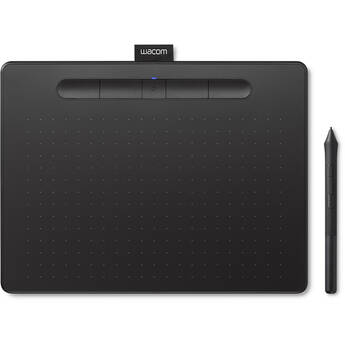
Wacom Intuos Bluetooth Creative Pen Tablet (Medium, Black)
- 8.5 x 5.3" Active Area
- 4096 Levels of Pressure Sensitivity
- USB & Bluetooth Connectivity
- 4 Programmable ExpressKeys
Wacom Pro Pen 2 with Pen Case
- 8192 Levels of Pressure Sensitivity
- Included Spare Nibs
- Included Color Identification Rings
- Compatible with Intuos Pro Tablets
Wacom Grip Pen
- Draw, Erase, and Mouse Functions
- Pressure and Tilt Sensitivities
- Ergonomic Design, Natural Feel
- Weighted Stand
Wacom Intuos Bluetooth Creative Pen Tablet (Small, Black)
- 6.0 x 3.7" Active Area
- 4096 Levels of Pressure Sensitivity
- USB & Bluetooth Connectivity
- 4 Programmable ExpressKeys
Wacom Intuos Pro Creative Pen Tablet (2025, Large)
- 13.7 x 7.7" 16:9 Active Area
- Wacom Pro Pen 3
- 8192 Levels of Pen Pressure Sensitivity
- USB & Bluetooth 5.3 Connectivity
Wacom Intuos Creative Pen Tablet (Small, Black)
- 6.0 x 3.7" Active Area
- 4096 Levels of Pressure Sensitivity
- USB Connectivity
- 4 Programmable ExpressKeys
Wacom Cintiq 16 Creative Pen Display (2025)
- 13.6 x 8.5" Active Area
- 16" 2560 x 1600 IPS Display (AG Glass)
- 8192 Levels of Pen Pressure Sensitivity
- 290 cd/m² Brightness
Xencelabs Pen Tablet (Small)
- 6.93 x 3.89" Active Area
- 8192 Levels of Pen Pressure Sensitivity
- USB Type-C & RF Wireless Connectivity
- 1 Shortcut Button
Wacom Cintiq Pro 27 Creative Pen & Touch Display
- 26.9" 4K 3840 x 2160 120 Hz Touchscreen
- 23.5 x 13.2" Active Area
- HDMI | Mini DisplayPort
- 8192 Levels of Pen Pressure Sensitivity
Wacom Cintiq 22 Creative Pen Display
- 18.7 x 10.5" Active Area
- 21.5" 1920 x 1080 Touchscreen
- 8192 Levels of Pen Pressure Sensitivity
- 210 cd/m² Brightness
Wacom Cintiq 24 Creative Pen Display (2025)
- 20.7 x 11.7" Active Area
- 23.6" 2560 x 1440 IPS Display
- 350 cd/m² Brightness
- 178°/178° Viewing Angles
Wacom Art Pen 2
- 8192 Levels of Pressure Sensitivity
- Three Programmable Buttons
- 360° Barrel Rotation
- Battery-Free EMR Technology
Wacom One 14" Creative Pen Display
- 12.2 x 6.9" Active Area
- 14" Full HD 1920 x 1080 IPS Display
- 4096 Levels of Pressure Sensitivity
- 1 x USB-C Port
Wacom Movink 13 Creative Pen & Touch Display
- 13.3" Full HD 1920 x 1080 Touchscreen
- 11.6 x 6.5" Active Area
- 2 x USB-C Ports
- 8192 Levels of Pen Pressure Sensitivity
Wacom 14" MovinkPad Pro All-in-One Mobile Drawing Tablet
- Qualcomm 8s Gen 3 Mobile CPU (SM8635P)
- 12GB RAM | 256GB Storage
- 14" 2880 x 1800 OLED Touchscreen
- 11.9 x 7.4" Active Area
Wacom Cintiq 24 Creative Pen & Touch Display (2025)
- 20.7 x 11.7" Active Area
- 23.6" 2560 x 1440 IPS Touchscreen
- 350 cd/m² Brightness
- 178°/178° Viewing Angles
Wacom Pro Pen 3
- Customizable Weight, Buttons & Grip
- 8192 Levels of Pressure Sensitivity
- 120° Tilt
- 0 to 3 Button Stylus
Wacom Intuos Pro Creative Pen Tablet (2025, Small)
- 7.4 x 4.1" 16:9 Active Area
- Wacom Pro Pen 3
- 8192 Levels of Pen Pressure Sensitivity
- USB & Bluetooth 5.3 Connectivity
Wacom Cintiq Pro 22 Creative Pen & Touch Display
- 21.5" 4K 3840 x 2160 120 Hz Touchscreen
- 18.7 x 10.5" Active Area
- HDMI | Mini DisplayPort | USB-C
- 8192 Levels of Pen Pressure Sensitivity
Wacom One Standard Pen (White/Gray)
- For Select Wacom One Pen Displays
- 2 x Side Buttons
- 4096 Pressure Levels
- 60° Tilt
Wacom Pen 2K
- For Select Creative Pen Tablets
- Battery-Free
- 2048 Levels of Pressure
- Programmable Side-Switch
Xencelabs Pen Tablet with Quick Keys Bundle V2 (Medium, Black)
- 10.33 x 5.8" Active Area
- 8192 Levels of Pen Pressure Sensitivity
- USB Type-C & RF Wireless Connectivity
- 3 Shortcut Buttons
Wacom One M Bluetooth Creative Pen Tablet (White)
- 8.5 x 5.3" Active Area
- USB & Bluetooth Connectivity
- 4096 Levels of Pressure Sensitivity
- Two-Button, Battery-Free Pen
Wacom One 12 Creative Pen Display
- 10.1 x 5.7" Active Area
- 11.6" 1920 x 1080 Full HD Display
- 4096 Levels of Pressure Sensitivity
- 2 x USB-C Ports
Xencelabs Pen Tablet with Quick Keys Bundle (Medium, Black)
- 10.33 x 5.8" Active Area
- 8192 Levels of Pen Pressure Sensitivity
- USB Type-C & RF Wireless Connectivity
- 3 Shortcut Buttons
Huion Kamvas Pro 13 2.5K Pen Display (Silvery Frost)
- 13.3" Fully Laminated Anti-Glare Screen
- 2.5K QHD 2560 x 1600 Resolution
- 8192 Pressure Levels / 120° Tilt Pen
- 7 x Programmable Buttons
Wacom Cintiq Pro 17 Creative Pen & Touch Display
- 17.3" 4K 3840 x 2160 120 Hz Touchscreen
- 15 x 8.5" Active Area
- HDMI | Mini DisplayPort | USB-C
- 8192 Levels of Pen Pressure Sensitivity
About Drawing Tablets and Tablet Pens
Professionals and hobbyists use graphics tablets and pens to take digital art to a whole new level. Accessories such as tablet mounts and stands make your workflow even easier.
What Are Graphics Tablets?
Other names for these devices include drawing tablets or digital art tablets. Using them alongside computers allows you to create digital images or writing. Tablets consist of hard work surfaces that respond to touch and pressure. The movements created on tablet screens display on different computer screens via software such as art programs. While most varieties show the work via computer monitors, there are other top-tier graphics drawing tablets that possess built-in displays. Some models are wireless, so there's no need for cables.
Using Tablet Pens
Tablet pens and styluses are the instruments you use for working with the tablets. Features vary from pen to pen, such as nibs, grips, and other specs. Preferred for drawing, digital art pens with eraser tips and side switches provide easy shortcuts for different functions. Most tablets come with pens, and pen display tablets include stand-alone or built-in mounts. If you already own a touch-screen device or tablet, it's possible to buy individual styluses and digital art pens to customize your work space.
Accessories for Drawing and Graphics Tablets
In addition to drawing tablets and pens, other accessories can enhance your setup. Some graphics tablets and handwriting accessories include different varieties of pen nibs, soft cases to protect from dust and scratches, connectors, and texture screens. Accessory kits are an ideal way to get a wide variety of pen components like grips and other replacement parts. Other convenient accessories are tablet mounts and stands that hold your device in place while you work. Many stands rotate and are adjustable to fit your working preferences.
Browse a large selection of graphics tablets and tablet pens and stylus options at B&H Photo and Video.