Graphic Tablets & Digital Pens

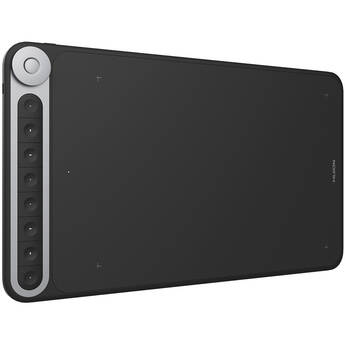
Huion Inspiroy Dial Q620M Pen Tablet
- 10.5 x 6.5" Active Area
- 8192 Levels of Pen Pressure Sensitivity
- USB Type-C Connectivity
- 8 Keys and 1 Dial Controller
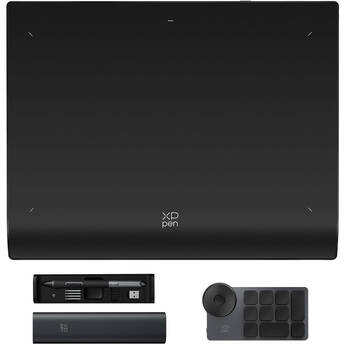
XPPen Deco Pro MW Wireless Pen Tablet (Gen 2)
- 9 x 6" Active Area
- Bluetooth 5.0 & USB Connectivity
- Matches A5 Paper Size
- 16,384 Pen Pressure Sensitivity Levels
Huion Inspiroy Keydial KD200 Wireless Bluetooth Pen Tablet
- Bluetooth 5.0 Connectivity
- Integrated One-Handed Keyboard
- Built-In Dial Controller
- 8192 Pressure Level / 120° Tilt Pen
XPPen Deco Pro LW Wireless Pen Tablet (Gen 2)
- 11 x 7" Active Area
- Bluetooth 5.0 & USB Connectivity
- Matches A4 Paper Size
- 16,384 Pen Pressure Sensitivity Levels
Xencelabs Pen Tablet (Medium, Black, 2024)
- 10.33 x 5.8" Active Area
- 8192 Levels of Pen Pressure Sensitivity
- USB Type-C & RF Wireless Connectivity
- 3 Shortcut Buttons
ViewSonic ID1330 ViewBoard Pen Display
- 11.6 x 6.5" Active Area
- 13.3" 1920 x 1080 Full HD Touchscreen
- Mini-HDMI + USB Type-C Ports
- 8192 Levels of Pressure Sensitivity
Xencelabs Pen Tablet & Quick Keys Special Edition Bundle v2 (Medium, Nebula White)
- 10.33 x 5.8" Active Area
- 8192 Levels of Pen Pressure Sensitivity
- USB Type-C & RF Wireless Connectivity
- 3 Shortcut Buttons
Wacom STU-540 Color Signature Pad
- 5" Color TFT Display
- 800 x 480 Resolution
- Supports Virtual COM Port (VCP) Mode
- Supports Citrix v7.6.3 and Newer
XPPen Artist 15.6 Pro V2 Pen Display
- 15.4" 1920 x 1080 Pen Display
- 13.42 x 7.55" Active Area
- Full-Lamination & Anti-Glare Film
- 2 x USB-C Ports
XPPen Artist 16 Pen Display (Gen 3)
- 15.4" 1920 x 1080 Pen Display
- 13.5 x 7.6" Active Area
- 2 x USB-C Ports
- 16,384 Pen Pressure Sensitivity Levels
XPPen Artist Pro 14 Pen Display (Gen 2)
- 14" 1920 x 1200 Pen Display
- 11.8 x 7.4" Active Area
- 2 x USB-C Ports
- 16,384 Pen Pressure Sensitivity Levels
Huion Kamvas 16 Gen 3 Pen Display with Stand (Black)
- 13.8 x 7.8" Active Area
- 15.8" 2560 x 1440 IPS Display
- 220 nits of Brightness
- Nano-Etched Canvas Glass Surface
Huion Kamvas 16 Gen 3 Pen Display (Black)
- 13.8 x 7.8" Active Area
- 15.8" 2560 x 1440 IPS Display
- 220 nits of Brightness
- Nano-Etched Canvas Glass Surface
Huion Kamvas RDS-160 Creative Pen Display with Foldable Stand
- 13.6 x 7.6" Active Area
- 15.6" Full HD 1920 x 1080 IPS Display
- 16.7 Million Colors / 145% sRGB Coverage
- 8192 Pressure Levels / 120° Tilt Stylus
XPPen Artist Pro 16 Pen Display (Gen 2)
- 16" 2560 x 1600 Pen Display
- 13.6 x 8.5" Active Area
- 2 x USB-C Ports
- 16,384 Pen Pressure Sensitivity Levels
Huion Kamvas RDS-220 Pen Display (Dark Gray)
- 18.7 x 10.5" Active Area
- 21.5" QHD 2560 x 1440 IPS Display
- 220 nits Brightness
- 1200:1 Static Contrast Ratio
XPPen Artist Pro 22 Pen Display (Gen 2)
- 22" 2560 x 1440 Pen Display
- 18.7 x 10.5" Active Area
- HDMI | USB-C
- 16,384 Pen Pressure Sensitivity Levels
Xencelabs Pen Display 16 Lite
- 13.6 x 7.6" Active Area
- 16" 3840 x 2160 4K OLED Pen Display
- 8192 Levels of Pen Pressure Sensitivity
- USB-C
Huion Kamvas 24 Plus Pen Display
- 20.74 x 11.67" Active Area
- 23.8" 2560 x 1440 IPS Display
- 220 cd/m² Brightness
- 178°/178° Viewing Angles
Xencelabs Pen Display 16 EDU Essentials Kit with Mobile Easel
- 13.6 x 7.6" Active Area
- 16" 3840 x 2160 4K OLED Pen Display
- 8192 Levels of Pen Pressure Sensitivity
- USB-C
Huion Kamvas Pro 16 Plus Pen Display (Dark Gray)
- 13.6 x 7.7" Active Area
- 15.6" 4K UHD 3840 x 2160 IPS Display
- 200 cd/m² Brightness
- 178°/178° Viewing Angles
XPPen Artist Ultra 16 4K OLED Multi-Touch Pen Display
- 15.6" 3840 x 2160 OLED Pen Touchscreen
- 13.6 x 7.6" Active Area
- 2 x USB-C Ports
- 16,384 Pen Pressure Sensitivity Levels
Xencelabs Pen Display 16 Essentials Kit with Desktop Easel
- 13.6 x 7.6" Active Area
- 16" 3840 x 2160 4K OLED Pen Display
- 8192 Levels of Pen Pressure Sensitivity
- USB-C Port
Huion Kamvas Pro 24 4K 23.8" Pen Display
- 23.8" Fully Laminated Anti-Glare Screen
- 4K UHD 3840 x 2160 Resolution
- 8192 Pressure Levels / 120° Tilt Pen
- Includes KD100 Mini Keydial
XPPen Artist Pro 24 4K Pen Display (Gen 2)
- 23.8" 3840 x 2160 Pen Display
- 20.7 x 11.65" Active Area
- DisplayPort | HDMI | USB-C
- 16,384 Pen Pressure Sensitivity Levels
Xencelabs Pen Display 24
- 20.7 x 11.7" Active Area
- 24" 3840 x 2160 4K Pen Display
- 8192 Levels of Pen Pressure Sensitivity
- HDMI | DisplayPort | USB-C
Xencelabs Pen Tablet Education Pack (Medium, Black)
- 10 x Pen Tablets | 15 x Pens
- 10.33 x 5.8" Active Area
- 8192 Levels of Pen Pressure Sensitivity
- USB Type-C & RF Wireless Connectivity
Huion Kamvas Pro 27 Pen & Touch Display
- 27" Laminated Anti-Glare Touchscreen
- 4K UHD 3840 x 2160 Resolution
- 16384 Pressure Levels / 120° Tilt Pen
- Includes Slim Pen, Keydial Mini & Glove
About Drawing Tablets and Tablet Pens
Professionals and hobbyists use graphics tablets and pens to take digital art to a whole new level. Accessories such as tablet mounts and stands make your workflow even easier.
What Are Graphics Tablets?
Other names for these devices include drawing tablets or digital art tablets. Using them alongside computers allows you to create digital images or writing. Tablets consist of hard work surfaces that respond to touch and pressure. The movements created on tablet screens display on different computer screens via software such as art programs. While most varieties show the work via computer monitors, there are other top-tier graphics drawing tablets that possess built-in displays. Some models are wireless, so there's no need for cables.
Using Tablet Pens
Tablet pens and styluses are the instruments you use for working with the tablets. Features vary from pen to pen, such as nibs, grips, and other specs. Preferred for drawing, digital art pens with eraser tips and side switches provide easy shortcuts for different functions. Most tablets come with pens, and pen display tablets include stand-alone or built-in mounts. If you already own a touch-screen device or tablet, it's possible to buy individual styluses and digital art pens to customize your work space.
Accessories for Drawing and Graphics Tablets
In addition to drawing tablets and pens, other accessories can enhance your setup. Some graphics tablets and handwriting accessories include different varieties of pen nibs, soft cases to protect from dust and scratches, connectors, and texture screens. Accessory kits are an ideal way to get a wide variety of pen components like grips and other replacement parts. Other convenient accessories are tablet mounts and stands that hold your device in place while you work. Many stands rotate and are adjustable to fit your working preferences.
Browse a large selection of graphics tablets and tablet pens and stylus options at B&H Photo and Video.