Computer Hubs

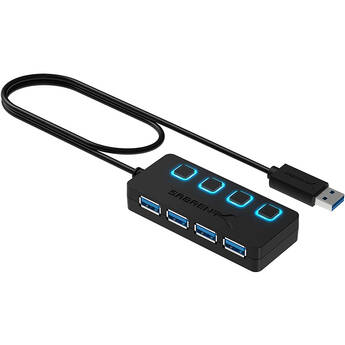
Sabrent 4-Port USB 3.0 Hub with Power Switches
- 1 x USB 3.0 Connector
- 4 x USB 3.0 Ports
- Each Port Includes Dedicated Power Switch
- Transfer Rate up to 5 Gb/s
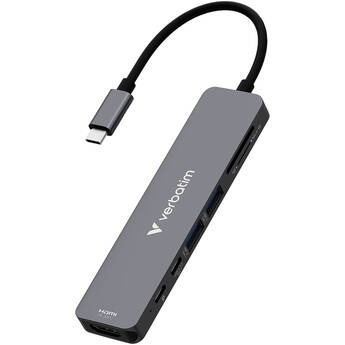
Verbatim Essentials 7-Port USB-C 3.2 Gen 1 Hub
- USB-C 3.2 Gen 1 Male Host Connector
- Up to 5 Gb/s Throughput
- 2 x USB-A Ports
- USB-C Data Port
TP-Link UH720 7-Port USB Hub with Charging Ports
- 7 x USB-A 3.0 Ports
- 2 x 2.4A USB-A Fast Charging Ports
- Up to 5 Gb/s Data Throughput
- Micro-B USB Host Connector
Xcellon Slim 7-Port USB 3.0 Hub
- 7 x USB-A 3.0 Ports
- Up to 5 Gb/s Data Transfer Speeds
- Slimline Design
- Individual Power Switches
EZQuest USB-C Slim Hub Gen 2 Adapter 6-In-1
- USB 3.2 Gen 2 Interface
- 1 x USB-C 4K at 60 Hz
- 4 x 10 Gb/s USB-C
- 1 x USB-C Power Delivery
Kondor Blue Mobile USB-C Media Hub (Space Gray)
- Improve Your Mobile Workflow
- 1 x HDMI & 3 x USB-C Ports
- Connect a Monitor, Drive, Power & Audio
- USB-C PD Power Passthrough
Satechi USB-C Multi-Port 8K Adapter with Ethernet V3 (Midnight)
- USB-C 3.2 Gen 2 Host Connection
- 1 x USB-C PD (100W Input, 80W Output)
- 1 x HDMI Port
- 3 x USB-C 3.2 Gen 2 Ports (10 Gb/s)
TP-Link UE330 3-Port USB 3.0 Type-A Hub with Gigabit Ethernet Adapter
- USB 3.0 Host Connection
- 3 x USB 3.0 Type-A Ports
- Up to 5 Gb/s Throughput
- 1 x Gigabit Ethernet Port
Rocstor Slim USB-C 6-in-1 4K Multiport Adapter
- USB-C Host Interface
- 1 x HDMI Port (4K at 60 Hz)
- 2 x USB-A 3.2 Gen 1 Port (5 Gb/s)
- 2 x USB-C Port
Satechi Mobile XR Hub with Audio
- USB-C 3.2 Gen 2 Host Connector
- 1 x USB-C Port (100W PD, Data & Audio)
- 1 x USB-C 3.0 Port (DP 1.4 & 10 Gb/s)
- 1 x 3.5mm Audio Input/Output Port
Comprehensive 7-Port USB 3.1 Gen 1 Charging Station and Hub
- 7 x USB 3.0 Type-A Ports
- Data Transfer Rate of up to 5 Gb/s
- DC Powered - Adapter Included
- Power On/Off Button
Kensington 12-in-1 SD5760T Thunderbolt 4 Dual 4K Docking Station
- Thunderbolt 4 Host Connection
- 1 x Thunderbolt 4 Port
- 1 x USB-C 3.2 Gen 2 Port
- 2 x USB-A 3.2 Gen 2 Ports
IOGEAR USB-A Multiport Hub
- Integrated USB-A 3.2 Gen 1 Cable
- 1 x USB-A 3.2 Gen 1 Port
- 1 x USB-C 2.0 Port
- 2 x USB-A 2.0 Ports
Xcellon 4-Port Slim USB 3.2 Gen 1 Type-C Hub
- Integrated USB-C Connector
- 4 x USB 3.2 Gen 1 Type-C Port
- Slim, Portable Design
- USB Bus-Powered
IOGEAR USB Type-C to 4-Port USB Type-A Hub with Power Delivery
- 4 x USB 3.0 Ports
- 1 x USB 3.0 Type-C Port
- 7.5W Fast Charging Port
- Power Delivery of up to 60W
CAMVATE Portable USB-C Hub Multiport 6-in-1 Adapter for Mac Pro
- 1 x USB-C 2.0 Port with 87W PD
- 1 x USB-A 3.2 Gen 1 Port
- 1 x USB-A 2.0 Port
- 1 x HDMI Port
Rocstor USB-C Multiport Docking Station (Gray)
- 2 x USB-A 3.0/3.1 Gen 1 Ports
- 1 x HDMI Port
- 1 x RJ45 Gigabit Ethernet Port
- MicroSD & SD Card Reader Slots
Verbatim 9-Port USB-C Pro CMH-09 Multiport Hub
- 2 x USB-C 3.2 Gen 2
- 1 x USB-A 3.2 Gen 2
- 2 x USB-A 3.2 Gen 1
- 1 x HDMI 4K at 60 Hz
Xcellon 6-in-1 USB-C Hub with Power Delivery
- Adds Six Ports to Your USB Type-C Laptop
- 1 x USB-C Charging Port (100W)
- 2 x USB-A 3.2 Gen 1 Ports
- UHS-I SDXC and microSDXC Card Readers
Sabrent 4-Port USB 2.0 Hub with 9.5" Cable
- Designed to Expand Connectivity
- Four USB 2.0 Type-A Ports
- Transfers up to 480 Mb/s
- 9.5" Cable with USB Type-A Connector
IOGEAR HUB-C USB Type-C to 4-Port USB Type-A Hub
- Connect up to 4 USB 3.0 Devices
- Data Transfer Rate of up to 5 Gb/s
- Hot Swappable
- Plug-n-Play
Neewer PS020E 4-in-1 USB-C 3.2 Gen 2 Hub with Cold Shoe Adapter
- USB-C 3.2 Gen 2 Host Connection (100W)
- 1 x USB-C 3.2 Gen 2 Port (100W)
- 3 x USB-C 3.2 Gen 2 Ports
- Supports Resolutions Below 4K at 60 Hz
Xcellon Slim 10-Port USB 3.0 Hub
- 10 x USB-A 3.0 Ports
- Up to 5 Gb/s Data Transfer Speeds
- Slimline Design
- Individual Power Switches
Belkin CONNECT USB Type-C 11-In-1 Multiport Dock (Silver)
- 2 x USB 3.0 / 3.1 Gen 1 Type-A Ports
- 1 x USB 2.0 Port
- 1 x RJ45 Gigabit Ethernet Port
- 1 x USB Type-C Power Input Port
HYPER HyperDrive Next 11-Port USB-C Hub (Midnight Blue)
- USB-C Host Connection
- 1 x USB-A 3.2 Gen 2 Port
- 1 x USB-A 3.2 Gen 1 Port
- 2 x USB-C 3.2 Gen 2 Port
Plugable USB-C 4-Port Hub (Black)
- 4 x USB-A Ports
- USB-A Host Connection
- USB 3.2 Gen 1 Interface
- Up to 5 Gb/s Data Transfer Speeds
Aluratek USB Type-C Multimedia Hub
- 2 x USB 3.1 Gen 1 Ports
- 1 x 4K HDMI Port
- Built-In SD and microSD Slots
- USB Bus Powered-No Power Cable Needed
Rocstor USB-C 3.2 Gen 2 Multi-Port 4-in-1 Adapter (Silver)
- USB-C Host Interface
- 1 x HDMI Port (4K at 60 Hz)
- 1 x USB-A 3.2 Gen 2 Port (Blue)
- 1 x USB 2.0 Port (Black)
What You Need to Know About Computer Hubs & USB Hubs
Computer hubs serve as network hardware devices that expand a single USB port into several ports that you can connect with other devices such as printers, computers, and other peripheral hardware for convenient data exchange. You can also use your computer hub to share a local area network and its bandwidth with multiple computers.
What Are Computer USB-C Hubs?
USB-C hubs have USB extenders that expand the female USB-C port on your devices to allow multiple possibilities of connectivity. They have the ability to connect to HDMI output cables, producing crystal clear video streaming with incredible fluency. USB-C hubs also have a slim and compact design that's perfect for everyday carrying. Models like the Thunderbolt 3 hub come with Ethernet ports to offer direct access to internet cables. With these multi-port USB hubs, you can connect keyboards, mice, thumb drives, cameras, scanners, and other devices. They also enable you to charge and synchronize your mobile devices to a local network. To achieve the connectivity to various USB ports, some hubs may require USB controller cards. Ethernet network interface cards are essential to connect computers to FireWire hubs for quick transfer of data.
Powered vs. Unpowered USB Hubs
USB hubs are available as powered or unpowered. Powered USB hubs use an external power source to bring each hub port into the same energy level as the system port. They also don't divide power consumption across all connected devices, but have converters and splitters, which split data bandwidth across all the devices. They're ideal for offices, as you can connect and charge multiple devices without any lag on your system.
Unpowered USB hubs lack an external power source and use the power from the computer's USB port. Since computer USB ports produce small amounts of current, they're ideal for devices that need low voltages like smartphones and tablets. Additionally, most of these models are portable and easy to use—simply plug and play.
Check out B&H Photo and Video's wide selection of computer hubs to find the right accessory for your USB connectivity needs.