External Hard Drives

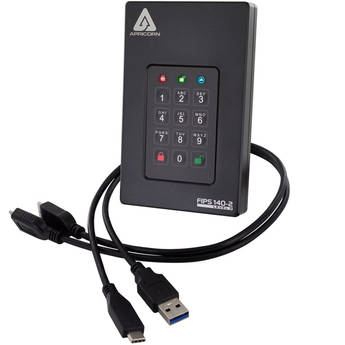
Apricorn 2TB Aegis Fortress L3 Encrypted Portable SSD
- 2TB Capacity
- Up to 5 Gb/s Data Transfer Speed
- Real-Time AES-XTS 256-Bit Encryption
- Integrated 10-Digit PIN Keypad
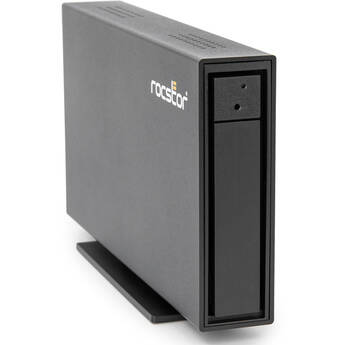
Rocstor 28TB Rocpro D91 USB-C 3.2 Gen 2 External HDD (TAA Compliant)
- 28TB Storage Capacity
- USB-C 3.2 Gen 2 Interface
- Hot-Swappable Design
- Preformatted for Mac
Rocstor 32TB Rocpro D91 USB-C 3.2 Gen 2 External HDD (TAA Compliant)
- 32TB Storage Capacity
- USB-C 3.2 Gen 2 Interface
- Hot-Swappable Design
- Preformatted for Mac
Oyen Digital 30TB HDX Pro C USB-C 3.2 Gen 2 External Enterprise Hard Drive
- 30TB Capacity
- 2 x USB-C 3.2 Gen 2 Ports
- Up to 270 MB/s Read & Write Speeds
- Daisy-Chain Capable | AC Powered
Apricorn 20TB Aegis Padlock DT FIPS 140-2 Level 2-Validated External Desktop Drive
- 20TB Capacity
- USB 3.2 Gen 1 Type-B Interface
- FIPS 140-2 Level 2 Validated
- AES-XTS 256-Bit Hardware Encryption
Glyph Technologies 8TB Atom EX20 High Intensity NVMe SSD
- 8TB Storage Capacity
- USB-C 3.2 Gen 2x2 Interface
- Up to 2100 MB/s Read Speeds
- Up to 2100 MB/s Write Speeds
TEAMGROUP 16TB T-CREATE EXPERT P32 Desk USB 3.2 Gen 2x2 External SSD
- 16TB Storage Capacity
- 20 Gb/s USB-C 3.2 Gen 2x2 Interface
- Sequential Read Speeds up to 1800 MB/s
- Sequential Write Speeds up to 1800 MB/s
Apricorn 32TB Aegis Padlock DT FIPS 140-2 Level 2-Validated External Desktop Drive
- 32TB Capacity
- USB 3.2 Gen 1 Type-B Interface
- FIPS 140-2 Level 2 Validated
- AES-XTS 256-Bit Hardware Encryption
Apricorn Aegis 4TB Padlock USB 3.0 Solid State Drive
- 4TB Capacity
- Super Speed USB 3.0 Interface
- Up to 300 Mb/s Data Transfer
- AES-XTS 256-Bit Hardware Encryption
Seagate 1TB One Touch USB 3.2 Gen 1 External Hard Drive with Password Protection (Black)
- 1TB Storage Capacity
- Micro-USB 3.2 Gen 1 Interface
- Password Activated Hardware Encryption
- Bus Powered
Seagate 1TB Portable USB-A 3.2 Gen 1 External Storage Drive
- 1TB Capacity
- USB-A 3.2 Gen 1 Interface
- Plug-and-Play Design
- Windows & macOS Compatible
TEAMGROUP 512GB T-Create Expert P34F Find My USB 3.2 Gen 2 External SSD
- Integrates with Find My for Tracking
- 512GB Storage Capacity
- USB-C 3.2 Gen 2 Interface
- Sequential Reads up to 1000 MB/s
LaCie 1TB Rugged USB-C 3.2 Gen 1 External Hard Drive
- 1TB Storage Capacity
- USB-C 3.2 Gen 1 Interface
- Up to 130 MB/s Data Transfer Speed
- Bus Powered
Toshiba 2TB Canvio Ready USB 3.2 Gen 1 Portable Hard Drive
- 2TB Capacity
- USB 3.2 Gen 1 Interface
- Up to 5 Gb/s Data Transfer Speeds
- NTFS Preformatted
LaCie 2TB USB 3.2 Gen 1 Type-C Mobile Drive
- 2TB Storage Capacity
- USB 3.2 Gen 1 Type-C Interface
- USB Type-C Cable Included
- Sleek, Portable Design by Neil Poulton
Transcend 1TB StoreJet 25C3 USB 3.0 External Hard Drive
- 1TB Storage Capacity
- USB 3.0 Interface
- Bus Powered
- USB 2.0 Compatible
LaCie 2TB Mobile Drive Secure USB 3.2 Gen 1 External Hard Drive
- 2TB Storage Capacity
- USB-C 3.2 Gen 1 Interface
- Up to 130 MB/s Data Transfer Speed
- Bus Powered
LaCie 2TB Rugged Mini USB 3.0 External Hard Drive
- 2TB Storage Capacity
- USB 3.0/3.1 Gen 1 Interface
- Up to 130 MB/s Data Transfer Speed
- Bus Powered
TEAMGROUP 256GB Expert P35S USB 3.2 Gen 2 External SSD
- One-Click Data Destruction
- Two-Step Safety Trigger
- 256GB Storage Capacity
- USB-C 3.2 Gen 2 Interface
Buffalo MiniStation Extreme NFC Portable Hard Drive (1TB)
SANDISK 500GB Portable SSD V3
- 500GB Storage Capacity
- 10 Gb/s USB-C 3.2 Gen 2 Interface
- Read Speeds up to 1000 MB/s
- Bus Powered
Transcend 512GB ESD310 Portable USB-C/A SSD (Metallic Silver)
- 512GB Storage Capacity
- USB-A & USB-C 3.2 Gen 2 Connectors
- Read Speeds up to 1050 MB/s
- Write Speeds up to 950 MB/s
Silicon Power 500GB CreatePro CR72X USB 3.2 Gen 2 Flash Drive (USB-C / USB-A)
- 500GB Storage Capacity
- Max Read Speed: 1050 MB/s
- Max Write Speed: 1000 MB/s
- Dual USB-C and USB-A Connectors
Verbatim 512GB SnapBack Ultra Slim USB 3.2 Gen 2x2 Portable SSD
- 512GB Storage Capacity
- USB-C 3.2 Gen 2x2 Interface
- Read Speeds up to 2050 MB/s
- Write Speeds up to 1900 MB/s
Rocstor 2TB Rocpro P33 5400 rpm USB-C Portable Hard Drive
- 2TB Storage Capacity
- 10 Gb/s USB-C 3.2 Gen 2 Interface
- 5400 rpm
- Bus Powered
ProGrade Digital 500GB PG30 Ultra Portable SSD
- 500GB Storage Capacity
- Read & Write Speeds up to 1000 MB/s
- Sustained Write Speeds of 300 MB/s
LaCie 4TB USB 3.2 Gen 1 Type-C Mobile Drive
- 4TB Storage Capacity
- USB 3.2 Gen 1 Type-C Interface
- USB Type-C Cable Included
- Sleek, Portable Design by Neil Poulton
WD 1TB My Passport USB 3.2 Gen 1 External Hard Drive (Sky)
- 1TB Capacity
- USB 3.2 Gen 1
- 256-Bit AES Hardware Encryption
- Bus-Powered, No External Power Required
Portable & USB Hard Drives
An external hard disk drive is a standalone storage device that provides additional space for your data. You can use it to backup important files from your computer's internal hard drive and to transfer files between computers. It has a larger storage capacity than other external storage devices, like USB drives and memory cards.
Portable vs. Desktop External Hard Drives
A portable external storage drive is smaller and lighter than a desktop model. It's a compact unit that houses a 2.5-inch hard drive in a protective enclosure. Desktop external hard disks have bigger housings, and usually use larger 3.5-inch hard drives. You can turn the internal hard disk in your old laptop (2.5-inch) or desktop PC (3.5-inch) into an external storage unit with the right hard drive enclosure.
Another difference between desktop and portable external hard drives is their power sources. Portable units are bus-powered. This means that they draw power with the same USB cable used for transferring data. Desktop units have separate AC adapters and draw more power. Hard drive arrays are another class of external storage devices. These have two or more drive bays for 2.5-inch or 3.5-inch hard disks. They serve as network-attached servers and support RAID levels that help them prioritize data redundancy, transfer speed, and storage capacity.
What's the Difference Between SSD and HDD?
A USB external hard drive can store files on a solid-state drive or a hard disk drive. While HDDs record data on spinning platters, SSDs use flash memory chips. With no moving parts, SSDs are faster and more durable. They’re also quieter and use less power. However, HDDs are more affordable and available in higher capacities.
Some brands offer SSDs in multiple form factors. For example, you can find 2.5-inch (direct replacement for laptop HDDs), M.2, and PCIe solid state drives in the HP hard drive line. Note that you need a 2.5-inch SSD and a 2.5-inch drive enclosure to build a SATA external hard drive. SATA, or Serial ATA, is a high-speed bus interface for connecting storage devices like HDDs and SSDs to computer motherboards. An external SATA (eSATA) drive enclosure connects a SATA HDD or SSD to a computer via USB.
Consider Speed When Selecting External Storage Drives
The overall data transfer speed of an external storage device depends on the speed of the drive used and the speed of the connection between the drive and your computer. Connection interface options for external drives include USB 2.0, 3.0, and 3.1, as well as eSATA and Thunderbolt. USB 3.0 external hard drives are 10 times faster than models with USB 2.0.
Most brands offer hard disks in two drive speeds: 5400 and 7200 rpm. Each type has its merits. For example, if you’re looking for a portable Toshiba hard drive, pick one with a 5400 rpm HDD. It has a lower power draw and is quick enough for everyday use. Pick a model with a 7200 rpm HDD if you regularly transfer large files and need a desktop external drive.
Keep important files safe by regularly backing them up onto an external hard disk. Find the right one, including fast SSD options, in the extensive selection of portable storage devices at B&H Photo and Video.