Hard Drive Enclosures & Docks

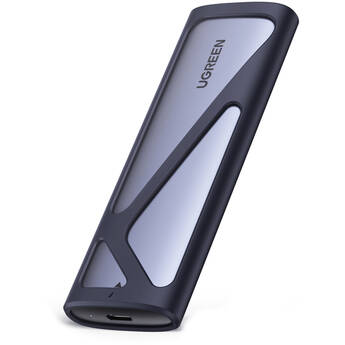
UGREEN USB 3.2 Gen 2 M.2 NVMe/SATA Enclosure
- 10 Gb/s USB-C 3.2 Gen 2 Host Connection
- 1 x M.2 SSD Slot
- Supports M.2 2280, 2260, 2242, and 2230
- Supports NVMe and SATA SSDs
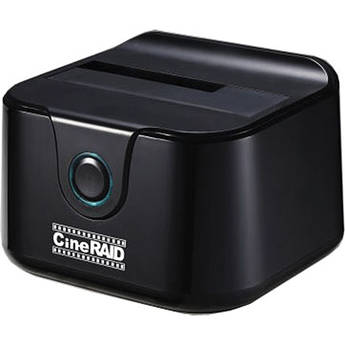
CineRAID CR-H116 USB 3.1 Gen 1 Hard Drive Dock
- 1 x 2.5" or 3.5" SATA I/II/III Drive
- Supports Hard Drive or SSD
- Tray-Less, Top-Loading Drive Dock
- USB 3.0 Connection
StarTech M.2 SATA SSD Enclosure
- Use Your M.2 SATA SSD Externally
- Supports 30, 42, 60, and 80mm M.2 Drives
- Micro-USB 3.1 Gen 2 Interface
- 1,000,0000 Hours MTBF
EZQuest Magnetic USB-C M.2 NVMe SSD Enclosure
- Fits an M.2 2230 NVMe PCIe SSD
- USB 3.2 Gen 2 Host Interface
- Up to 10 Gb/s Data Transfer Speeds
- MagSafe Compatible
Rocstor Rocpro D90 Desktop USB-C 3.2 Gen 2 External Drive Enclosure
- 1 x 2.5" or 3.5" SATA III Drive Bay
- USB-C 3.2 Gen 2 Host Connection
- 18TB HDD Compatible
- Aluminum Construction
CineRAID Standalone Duplicator and USB 3.1 Gen 1 Dual Hard Drive Docking Station
- Duplicates 2.5"/3.5" SATA HDDs & SSDs
- Clones without a Computer
- USB 3.0 Interface
- SATA I, II, III Interface
CineRAID Wireless USB 3.1 Gen 1 Hard Drive Enclosure
- USB 3.0 Interface
- 802.11b/g/n Wi-Fi Compatible
- Holds 2.5" SATA HDD or SSD
- Supports up to 1TB
StarTech USB 3.1 Drive Docking Station for 2.5" and 3.5" SATA Drives
- 1 x 2.5"/3.5" SATA III Drive Bay
- 1 x 10 Gb/s USB 3.1 Type-B Port
- 1 x 6 Gb/s eSATA Port
- UASP & TRIM Support
StarTech USB 3.1 Single-Bay Docking Station
- Fits One 2.5"/3.5" SSD or HDD
- Data Transfer Rates of up to 10 Gbps
- Supports Drives up to 6TB
- Built-In Ejection Button
Wavlink USB4 PCIe NVMe SSD Enclosure
- 1 x M.2 M-Key/B+M Key Slot
- Supports M.2 2280, 2260, 2242, and 2230
- 1 x 40 Gb/s USB4 Host Port
- Sequential Reads of up to 3800 MB/s
StarTech USB 3.0/eSATA to Dual 2.5/3.5" HDD/SSD Docking Station with UASP
- Holds Dual 2.5/3.5" HDDs or SSDs
- USB 3.0/eSATA Connectivity
- Backwards Compatible with USB 2.0/1.1
- Supports SATA III (6 Gbps) & UASP
Icy Dock ExpressCage 6-Bay 2.5" SAS/SATA Drive Cage for 5.25" Bay
- Mounts Six 2.5" Drives into 5.25" Bay
- Supports 5 to 9.5mm Tall Drives
- SAS/SATA III 6 Gb/s Interface
- Two 40mm Cooling Fans
Rocstor Rocpro D91 USB-C 3.1 Gen 2 External Hard Drive Enclosure
- 10 GB/s Technology, USB 3.1 Gen 2
- USB-C Ports, Enclosure Only
- Speeds up to 10,000 Mb/s
- Hot-Swap Tray
StarTech USB 3.0 to Dual 2.5/3.5" HDD/SSD Docking Station with UASP
- Holds Dual 2.5/3.5" HDDs or SSDs
- USB 3.0 Connectivity
- Backwards Compatible with USB 2.0/1.1
- Supports SATA III (6 Gbps) & UASP
Sabrent 5-Bay USB-C Docking Station for 2.5" SATA HDDs and SSDs
- Store up to Five 2.5" Drives
- 1 x USB-C 3.2 Gen 2
- Hot-Swappable, Plug & Play
- Tool-Free Installation
HYPER HyperDrive USB4 NVMe SSD Enclosure
- USB-C (USB4) Host Connection
- 1 x M.2 NVMe PCIe SSD
- Max 4TB Storage Capacity
- Easy Snap-In Installation
Wavlink USB4 V2 PCle Gen4 NVMe SSD Enclosure
- 1 x PCIe 4.0 x4 M.2 Slot
- 1 x 80 Gb/s USB4 2.0 Host Port
- Sequential Reads of up to 6000 MB/s
- Sequential Writes of up to 5000 MB/s
BLACKJET Thunderbolt 3 4-Bay Cinema Dock System
Ulanzi DT580 80 Gb/s M.2 NVMe SSD Enclosure
- 1 x 80 Gb/s Thunderbolt 5 Interface
- 1 x NVMe M.2 2280 SSD Slot
- Supports M.2 M-Key / B & M Key SSDs
- Data Transfers up to 7043 MB/s
BLACKJET TX-2DS 2-Bay Thunderbolt 3 Docking System Rack Mount Bundle
CRU-DataPort Forensic ComboDock V6
- 1 x USB-C 3.2 Gen 2 Port
- 1 x IDE Port
- 1 x eSATA & 1 x SATA Power Port
- Aluminum Construction
iStarUSA 4-Bay 2.5" SAS/SATA miniSAS Hot-Swap Tower (Black)
- 4 x 2.5" Hot-Swappable Bays
- Semi-Transparent Door with Key Lock
- 2.5" SAS I/II, SATA I/II/III HDD Support
- 1 x miniSAS SFF8088 Interface
iStarUSA 8-Bay 2.5" SATA 6.0 Gb/s eSATA Hotswap Tower (Black)
- 8 x 2.5" Hot-Swap Bays
- Supports 2.5" SATA I/II/III HDDs
- HDD Tray with Thumb Screw Design
- Supports 6.0 Gb/s Hard Drives
iStarUSA 5-Bay SATA 6.0 Gb/s eSATA-Port Multiplier Hotswap Tower (Black)
- 5 x 3.5" Hotswap Bays
- Supports 3.5" SATA I/II/III HDDs
- 1 x 4.7" Cooling Fan
- 150W Open-Frame Power Supply
Areca ARC-4036 8-Bay 6 Gbps SAS Tower JBOD Enclosure
- Supports up to 8x 6 Gbps SAS/SATA Drives
- 2x SAS Host In Connectors
- 2x SAS Expansion Out Connectors
- 6-Pin UART RJ-11 Connector
iStarUSA DAGE212U40BK-3MS-R 12-Bay SAS/SATA Mini-SAS SFF8088 JBOD Enclosure (Black)
- 550W Redundant Power Supply
- Supports up to 12 x SAS/SATA I/II HDDs
- 3 x Mini-SAS (SFF8088) Connectors
- 4 x 3.15" (80mm) Cooling Fans
Learning About External Hard Drive Enclosures and Docks
Put your spare hard drives to good use by converting them into external storage drives, with hard drive enclosures and docks. Whether you're reclaiming internal hard drives from old PCs or buying new ones to use as external drives, you need enclosures and docks to connect them to your computer. The cases link the interfaces used by storage drives with the USB ports of computers. They also serve as protective shells for fragile hard disk drives (HDD).
What's the Difference Between Hard Drive Docks and Enclosures?
An enclosure encompasses a hard drive completely. Some enclosures hold single drives while others have multiple bays for two or more hard drives. A dock has slots rather than bays. Since a hard drive goes into a dock vertically, part of it remains exposed. This design makes hot-swapping drives easier. To remove the drive in an HDD enclosure, you have to first open the casing.
How to Choose the Right HDD Enclosure and Dock
Key factors to consider include material used, hard drive size and interface, and connection type. Most docks and enclosures are metal, rubber, or plastic. Metal units are very durable, while rubber ones offer excellent protection from shock and impact. Aluminum is a common choice that's both strong and lightweight. Some enclosures and docks can only accommodate the 2.5-inch drives commonly used by laptops, while others can fit desktop-class, 3.5-inch drives. To fit a 2.5-inch drive in a bay or slot made for 3.5-inch units, you'll need an internal hard drive cage. This converter bracket makes 2.5-inch hard disk and solid-state drives (SSDs) just as big as 3.5-inch HDDs.
You should also make sure the chosen enclosure or dock supports your drive's interface. SATA interfaces are the most common, but they have different subtypes (SATA I, II, and III). Choosing a SATA III casing is advisable, as it'll be backward-compatible with the older standards. Most docks and enclosures connect to computers via USB ports. Like SATA, there are multiple generations of USB (1.1, 2.0, 3.0, and 3.1). For fast transfer speeds, choose a casing with one or more USB 3.0 ports. Some have USB-C ports. These are smaller, reversible USB ports, increasingly found on computers and mobile devices. An Apple Thunderbolt enclosure can connect to the ultra-fast Thunderbolt ports found on high-end computers. While Thunderbolt 1 and 2 use the Apple Mini DisplayPort connector, Thunderbolt 3 employs the widely adopted USB-C connector.
What's in a Hard Drive Enclosure Kit?
This package contains everything you need to install an internal hard drive in an enclosure. In addition to the protective case, the kit includes a USB drive adapter cable and SATA adapter. Some manufacturers also provide mounting screws and screwdrivers.
Reuse old hard drives by placing them in hard drive enclosures and hard drive docking stations. Find a wide selection of RAID enclosures and SSD enclosures among B&H Photo and Video's extensive inventory of external and internal hard drive accessories.