Docking Stations

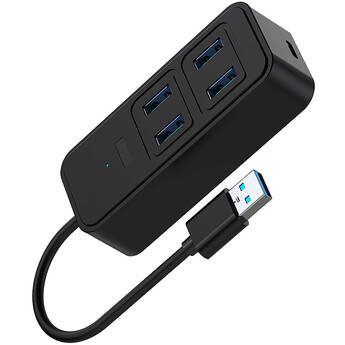
CAMVATE 5-in-1 USB Multiport Adapter
- USB-A Host Connection
- 4 x USB-A 3.0 Gen
- 1 x USB-C Port
- 5W Charging Pass-Through
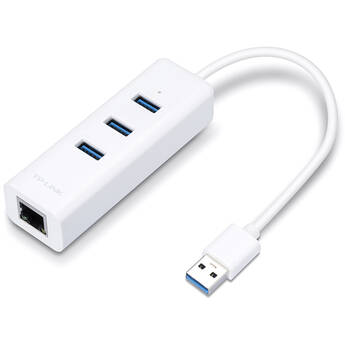
TP-Link UE330 3-Port USB 3.0 Type-A Hub with Gigabit Ethernet Adapter
- USB 3.0 Host Connection
- 3 x USB 3.0 Type-A Ports
- Up to 5 Gb/s Throughput
- 1 x Gigabit Ethernet Port
Sabrent USB-C 3-Port Gaming Hub (Black)
- For Valve Steam Deck
- 1 x USB-C 3.2 Gen 1 Port
- 2 x USB-A 3.2 Gen 2 Port
- Integrated USB-C Connector
Rocstor 4-Port USB 3.0 Type-A Female Hub with USB Type-C Male Connector
- USB 3.0 (USB 3.2 Gen 1) 5 Gb/s
- 4 x USB Type-A Female Ports
- 1 x USB Type-C Male Connector
- Bus Powered
Sabrent HB-C4WP USB-C 3-Port Hub
- 5.9" Integrated USB-C Host Cable
- 1 x USB-A 3.2 Gen 1 | 2 x USB-A 2.0
- 1 x USB-C with 100W Power Delivery 3.0
- Aluminum Housing
C2G 4-Port USB 2.0 Type-A Hub
- 4 x USB 2.0 Type-A Ports
- Data Transfer Rates of up to 480 Mb/s
- Slim & Portable Design
- Integrated Cable with USB Type-A Male
Transcend 4-Port USB 3.1 Gen1 Hub
- 4 x USB-A 3.1 Gen1 Ports
- Data Transfer Rates of up to 5 Gb/s
- Bus-Powered Design
- Ultra-Slim & Portable
StarTech USB-C to 4-Port USB-A 3.2 Gen 1 Mini Hub (Black)
- USB-C 3.2 Gen 1 Male Connector
- 4 x USB-A 3.2 Gen 1 Female Ports
- Cable Management Clip
- Bus Powered
C2G 4-Port USB 3.1 Gen 1 Type-A Hub
- 4 x USB 3.1 Gen 1 Type-A Ports
- Data Transfer Rates of up to 5 Gb/s
- Slim & Portable Design
- Integrated Cable with USB Type-A Male
Monoprice 4-Port USB 3.0 Switch Hub
- 4 x USB 3.0 / 3.1 Gen 1 Type-A Ports
- USB 3.1 Gen 1 Type-A Male Host Connector
- Data Transfer Rates up to 5 Gb/s
- Individually Switched Ports
StarTech 4-Port USB-A 3.2 Gen 1 Mini Hub (Black)
- USB-A 3.2 Gen 1 Male Connector
- 4 x USB-A 3.2 Gen 1 Female Ports
- Cable Management Clip
- Bus-Powered
StarTech Portable 4-Port SuperSpeed Mini USB 3.0 Hub
- 4 x USB 3.0 Type-A Female Ports
- Integrated USB 3.0 Cable
- Data Transfer Rates up to 5 Gbps
- Backwards Compatible with USB 2.0/1.x
Rocstor 4-in-1 Portable USB Hub (Black)
- USB-C Host Connection
- 4 x USB-A Ports
- USB 3.2 Gen 1 Interface
- Windows, Mac, Linux & ChromeOS Support
Anker 5-in-1 USB-C Hub
- Integrated 9.84" USB-C Cable
- 1 x USB-C PD Charging Port (100W Max)
- 1 x USB-A 3.2 Gen 1 Port
- 2 x USB-A 2.0 Ports
Manhattan 4-Port USB 3.0 Type-A Hub
- 4 x USB 3.0 Type-A Ports
- For USB Type-C Systems
- Bus Powered - No External Power Required
- Plug-and-Play Compatible
Sabrent USB 3.0 4-Port Aluminum Hub (Black)
- 4 x USB 3.0 Ports/3.1 Gen 1
- Up to 5 Gb/s Data Transfer Rate
- Plug-and-Play
- Aluminum Mac-Style Design
CAMVATE 5-in-1 USB-C Multiport Adapter (Silver)
- 1 x USB-A 2.0
- 1 x USB-A 3.2 Gen 1
- SD & microSD Card Slots
- RJ45 LAN Port
Rocstor 4-Port USB 3.0 Hub
- USB 3.0 Interface (5 Gb/s)
- 4 x USB Type-A Female Ports
- 1 x USB Type-A Male Connector
- 6" Integrated Cable
CAMVATE 8-in-1 USB Docking Station (Silver)
- USB-C Cable with Built-In USB-A Adapter
- 3 x USB-A 2.0 Ports
- 1 x USB-A 3.2 Gen 1 Port
- 1 x USB-C Port
Verbatim Essentials 7-Port USB-C 3.2 Gen 1 Hub
- USB-C 3.2 Gen 1 Male Host Connector
- Up to 5 Gb/s Throughput
- 2 x USB-A Ports
- USB-C Data Port
ALOGIC Fusion SWIFT 4-Port USB-A 3.2 Gen 1 Hub
- Integrated USB-A 3.2 Gen 1 Cable
- 4 x USB-A 3.2 Gen 1 Data Ports
- Data Transfer Rates of up to 5 Gb/s
- EMI Shielding
TP-Link UH7020C USB-C 7-in-1 Hub
- USB-C Male Connector
- 1 x HDMI Female Port (4K @ 60 Hz)
- 1 x USB-C Female Port (100W PD)
- 1 x USB-C 3.2 Gen 1 Female Port (5 Gb/s)
Rocstor Portable 4-Port Hub USB-C to 4x USB-A 3.0 (Aluminum Gray)
- Bus Powered
- Increases Your Computers Connectivity
- Wide Computer Compatibility
- Plug-and-Play
Targus ACH114US 4-Port Hub (Black)
- Conveniently Adds 4 USB 2.0 Ports
- Data Transfer Rate of up to 480 Mb/s
- Compact Design
- RoHS Compliant
HYPER HyperDrive Flex 4-Port USB-C 3.2 Gen 1 Combo Hub
- Integrated USB-C 3.2 Gen 1 Host Cable
- Up to 5 Gb/s Data Throughput
- 2 x USB-C Ports
- 2 x USB-A Ports
Rocstor Premium USB Type-C 3-in-1 Multiport Video Adapter
- USB Type-C Connector on Short Cable
- HDMI, DVI, and VGA Ports
- Up to UHD 4K60 Resolution
Sabrent 6-Port Docking Station for Steam Deck
- For the Valve Steam Deck
- 3 x USB-A Ports
- 2 x USB-C Ports
- HDMI 2.0 Video Out
StarTech 4-Port Compact USB 2.0 Hub (Black)
- Data Transfer Rate of up to 480 Mb/s
- Supports up to 127 USB 2.0 Devices
- Backwards Compatible with USB 1.1/1.0
- Compact & Lightweight
Computer Docking Stations and Port Replicators
If you need to connect your laptop or notebook to computer peripherals and devices, consider using docking stations and port replicators. With a docking station, you can essentially turn your laptop into a home computer. As soon as you plug your notebook or laptop into the docking station, you'll instantly connect with all of your pre-attached devices, including your speakers, printer, keyboard, and more.
How Docking Stations Work
Docking stations are all about convenience. If you connected your notebook or laptop to multiple devices every time you came home or arrived at your office, you'd continuously deal with bundles of wires and adapters. These accessories reduce everything to a single connection. Some docking stations also include a network interface card, which allows you to connect to a local area network.
What's a Port Replicator?
A port replicator is a type of docking station. Generally speaking, port replicators work with specific laptops models, and they're not standardized or universal. Each docking station has slightly different ports and connections, so you're likely looking for a particular functionality, such as USB 3.0, Thunderbolt, HDMI, VGA, DVI, and many others. Some models connect seamlessly to your device, and they're easily portable. Others are larger and more suitable to keep where you do most of your work on your notebook or laptop.
Using Computer/Laptop Docking Stations
Using Thunderbolt 3 docks, you can tether up to six Thunderbolt 3 devices with a single cable. This is useful if you want to connect a laptop, multiple monitors, and an extended storage device using a single dock. As long as you have USB-C docking stations, you can use Thunderbolt 3 cables to tether devices together. But while USB-C and Thunderbolt 3 cables use identical ports, using Thunderbolt 3 in a USB-C port won't give you the same level of functionality as a dedicated Thunderbolt 3 port. Using notebook tethering accessories is a smart way to add tons of features to your device.