Mice & Touchpads

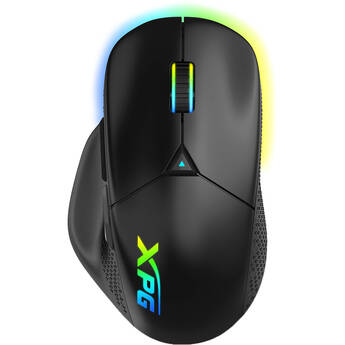
XPG ALPHA WIRELESS Gaming Mouse (Black)
- 2.4 GHz & Bluetooth Connection
- PAW 3335 Optical Sensor
- 6 Programmable Buttons
- Premium OMRON Switches
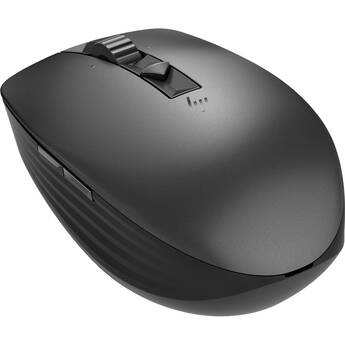
HP 635 Multi-Device Wireless Mouse
- 2.4 GHz Wireless & Bluetooth Connection
- Track-on-Glass Sensor
- 800 to 3000 dpi (Default 1200 dpi)
- Seven Total Buttons
Razer Viper V3 HyperSpeed Wireless Mouse (Black)
- Wireless HyperSpeed Connectivity
- 30,000 dpi Optical Sensor
- 6 Programmable Buttons
- 1000 Hz Base Polling Rate
HP 785M Ultra-Fast-Scroll Wireless Mouse
- 2.4 GHz Wireless | Bluetooth Connection
- Up to 6000 dpi
- Six Programmable Buttons
- Dual Scroll Wheels
Keychron M5 Wireless Ergonomic Mouse (Black)
- Bluetooth 5.3 & 2.4 GHz RF Connectivity
- 30,000 dpi Optical Sensor
- Five Programmable Buttons
- 8000 Hz Polling Rate
Matias USB-C Pro Mouse (Black)
- Wireless Connectivity
- 4 x Buttons
- Aluminum Scroll Wheel
- Right-Handed Design
Mad Catz R.A.T. 6+ Optical Gaming Mouse
- 6' Wired Connection
- 12,000 dpi Optical Sensor
- Eleven Programmable Buttons
- Fully Compatible with Windows 7 & Later
ZAGG Pro Mouse Wireless
- RF Wireless Connection
- 1600 dpi Optical Sensor
- Seven Buttons
- Pairs with up to Three Devices at Once
Microsoft Surface Arc Wireless Mouse (Violet)
- 2.4 GHz RF & Bluetooth 4.1 Connectivity
- 1800 dpi
- Up to 32.8' Wireless Range
- Microsoft BlueTrack Sensor
Logitech G G305 X SUPERLIGHT Wireless Gaming Mouse (Black)
- LIGHTSPEED Wireless and USB Connectivity
- Bluetooth Connectivity
- 44,000 dpi HERO Optical Sensor
- Six Programmable Buttons
AZIO Retro Classic Mouse (Maple)
- Designed to Match the Retro Classic Line
- Bluetooth & Wireless USB RF Connectivity
- 400 to 3000 dpi Optical Sensor
- Three Built-In Buttons
R-Go Tools Break Wireless Mouse (Large, Right-Handed)
- Wireless Bluetooth 5.0 Connection
- LED Light Break Indicator
- 2400 dpi Optical Sensor
- DPI Switch
Contour Design Unimouse Wired Mouse (Left-Handed)
- Wired USB Connection
- 2800 dpi Laser Sensor
- Six Programmable Buttons
- LED dpi Status
BenQ U2 Wireless Gaming Mouse
- RF Wireless Connection
- 26,000 dpi Optical Sensor
- Five Buttons
- 1000 Hz Polling Rate
Logitech G G703 HERO Wireless Gaming Mouse
- 2.4 GHz Wireless Connectivity
- 100 to 25,600 dpi HERO Sensor
- Six Programmable Buttons
- 1000 Hz Report Rate
AZIO Retro Classic Mouse (Artisan)
- Designed to Match the Retro Classic Line
- Bluetooth & Wireless USB RF Connectivity
- 400 to 3000 dpi Optical Sensor
- Three Built-In Buttons
Contour Design Unimouse Wireless Mouse (Left-Handed)
- RF Wireless Connection
- 2800 dpi Laser Sensor
- Six Programmable Buttons
- LED dpi and Battery Status
Evoluent VerticalMouse D Wired Mouse (Medium, Dark Silver)
- 6.9' Wired USB Connection
- Laser Sensor with Adjustable dpi
- Adjustable Pointer Speeds
- Pointer Speed LED Indicator
Evoluent VerticalMouse D Wired Mouse (Large, Dark Silver)
- 6.9' Wired USB Connection
- Laser Sensor with Adjustable dpi
- Adjustable Pointer Speeds
- Pointer Speed LED Indicator
Logitech G PRO 2 LIGHTSPEED Wireless Mouse (Pink)
- LIGHTSPEED Wireless Connectivity
- Logitech HERO 2 Sensor
- 100 - 32,000 DPI
- Six Programmable Buttons
Logitech G PRO 2 LIGHTSPEED Wireless Mouse (White)
- LIGHTSPEED Wireless Connectivity
- Logitech HERO 2 Sensor
- 100 - 32,000 DPI
- Six Programmable Buttons
Acer Predator Cestus 530 Gaming Mouse
- 2.4 GHz Wireless & Bluetooth Connection
- Wired USB-C Connectivity
- PixArt PAW3395 Sensor
- Up to 26,000 dpi
R-Go Tools Twister Ambidextrous Mouse
- Wireless or Wired Connection
- LED Light Break Indicator
- 2400 dpi Optical Sensor
- Ergonomic Shape
Evoluent VerticalMouse 4: Wireless Right Hand Mouse
- Avoids Forearm Twisting
- Supports Your Hand in an Upright Posture
- Comfortable and Easy to Use
- Features Six Programmable Buttons
Evoluent VerticalMouse 4 Small Wireless (Black/Brown)
- For Right-Handed Users
- 2.4 GHz Wireless Connectivity
- Sculpted for Comfort
- Thumb Rest
Razer Cobra Pro Wireless Mouse (Black)
- Wireless, Bluetooth & USB-C Connection
- 30,000 dpi Optical Sensor
- 8 Programmable Buttons
- Base 1000 Hz Polling Rate
Evoluent VerticalMouse D Wireless Mouse (Large, Dark Silver)
- Wireless Connection with USB Receiver
- Laser Sensor with Adjustable dpi
- Adjustable Pointer Speeds
- Pointer Speed LED Indicator
Dell MS900 Premier Wireless Mouse
- RF Wireless Connection
- Up to 8000 dpi Laser Sensor
- Seven Programmable Buttons
- 3-Month Battery Life
Touchpads, Wireless Mice, USB-C Mice, and More
Mice or tracking pads are important parts of computer setups. Depending on computer use, most people need advanced options, such as USB-C mice, to carry out various tasks. These tasks relate to graphics design, gaming, business, and more. For all computer tasks, choosing the right mouse gives you a comfortable experience over extended periods.
Options for Mice and Touchpads
Computer mice are necessary for casual computer browsing and most other tasks. Dedicated gaming mice are ideal for playing video games on computers. Some gamers use controllers, and these devices create a console gaming experience. Most laptops come equipped with trackpads by default, but you can also get external ones for use with any computer. Trackballs use rotating balls for more comfortable scrolling.
Using Different Interfaces for Mice and Touchpads
You can connect your computer mouse and touchpad in a number of different ways. A USB-C mouse features a fast connection, quick response time, and increased durability. A USB wireless mouse eliminates the need for cords and cables, giving you more freedom as you scroll. To get the best of both worlds, USB-C wireless mice are also available. Instead of connecting via a wireless USB dongle, you can use a Bluetooth mouse to connect directly to your computer's built-in Bluetooth receiver. PS-2 is another type of connection that you can use for your mouse, and it's similar to normal USB connections.
Choosing the Right Tracking Type
Both laser and optical tracking types use light to detect movement in the mouse. For best results, you'll need mouse pads to provide a clear tracking surface for these mice. However, with trackballs, you won't need a mouse pad. Sensors within the trackball trace movement, and the case itself doesn't move. You can also use mice with Bluetrack technology on virtually any surface, whether wood, plastic, or granite countertop. If you want to use your mouse on glass or mirror surfaces, mice with Darkfield tracking technology are ideal and most suitable.
Check out B&H Photo and Video for a wide selection of mice and trackpads, including ergonomic Bluetooth mice, trackballs, USB-C mice, and much more.