Mice & Touchpads

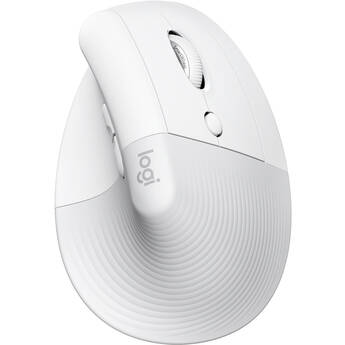
Logitech Lift Vertical Ergonomic Wireless Mouse (Off-White)
- Wireless via Logi Bolt USB or Bluetooth
- 4000 dpi Sensor
- Powered by a Single AA Battery
- Vertical, Ergonomic Design
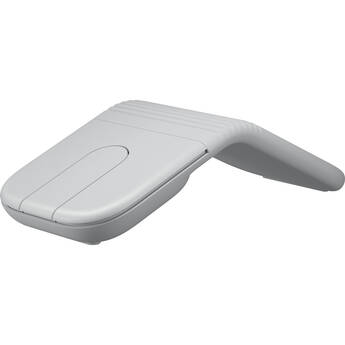
Logitech Mobi Fold Wireless Mouse (Off-White)
- Wireless via Bluetooth or Logi Bolt
- 4000 dpi Optical Sensor
- Touch Panel Mouse Buttons
- Adaptive Touch Scrolling
Logitech Lift Vertical Ergonomic Wireless Mouse for Business (Graphite)
- Wireless via Logi Bolt USB or Bluetooth
- 4000 dpi Sensor
- Powered by a Single AA Battery
- Vertical, Ergonomic Design
Logitech M170 Wireless Mouse (Blue)
- 2.4 GHz Wireless Connectivity
- Up to 12-Month Battery Life
- Ergonomic Ambidextrous Design
- Plug-and-Play
Macally USB-C Wired Mouse with Scroll (Aluminum)
- USB-C Wired Connection
- Optical Sensor
- Adjustable Sensitivity Settings
- 3 Button Design
Logitech M325S Wireless Mouse (Black)
- 2.4 GHz RF Wireless Connectivity
- 1000 dpi Optical Sensor
- Five Programmable Buttons
- Tilt Scroll Function
Satechi Slim LX USB-C Wired Mouse (Silver)
- Wired USB-C Connection
- Integrated USB-A Adapter
- Anodized Aluminum Design
- Metal Scroll Wheel
Matias Wireless USB-C Mouse (Black)
- Wireless Connectivity
- Scroll Wheel
- 4-Button Design
- USB-C Nano Receiver
Satechi M1 Wireless Mouse (Space Gray)
- Bluetooth 4.0 Wireless Connection
- Wireless Range of up to 32'
- Rechargeable USB Type-C Port
- Ergonomic Design
Dell MS3220 Wired Mouse (Black)
Logitech Signature M650 Medium Wireless Mouse for Business (Graphite)
- 2.4 GHz & Bluetooth Wireless Support
- 400 to 4000 dpi Optical Sensor
- 5-Buttons
- 24-Month Battery Life
Logitech G G705 LIGHTSPEED Wireless RGB Gaming Mouse (White Mist)
- LIGHTSPEED | Bluetooth | USB Type-C
- 8200 dpi Sensor
- 6 x Programmable Buttons
- LIGHTSYNC RGB Lighting
Razer Basilisk V3 Pro Wireless Mouse (Black)
- Wireless, Bluetooth & USB-C Connection
- 30,000 dpi Optical Sensor
- 11 Programmable Buttons
- 1000 Hz Base Polling Rate
Kensington SlimBlade Pro EQ Wireless Trackball
- Bluetooth & 2.4 GHz Wireless Connection
- Ambidextrous, Low-Profile Design
- 1600 dpi Dual Optical Sensors
- 8 Programmable Buttons
Contour Design RollerMouse Red Plus Wired Mouse
- Wired USB-A Connection
- Rollerbar Cursor Control
- Up to Three Months of Battery Life
- Battery Level Lightbar
3Dconnexion SpaceMouse Enterprise Kit 2
- Include SpaceMouse Enterprise
- Includes CadMouse Pro Wireless
- Includes CadMouse Pad
- Includes 3Dconnexion Universal Receiver
Kensington MY201 Simple Solutions Wired Mouse
- USB-A Wired Connection
- 1600 dpi Optical Sensor
- Three Buttons
- Ambidextrous Design
Lenovo WL310 Bluetooth Silent Mouse
- Bluetooth 5.0 Connection
- 1600 dpi Optical Sensor
- 6 Programmable Buttons
- Ergonomical Design
Logitech M190 Full-Size Wireless Mouse (Charcoal)
- Integrated Optical Sensor
- 1000 dpi Sensor Resolution
- 3-Button Control
- 33' Range
Macally TURBO Wired Mouse
- 5' Wired USB Connection
- 1000 dpi Optical Sensor
- 3 Buttons
- Scroll Wheel
Satechi C1 USB Type-C Wired Mouse
- Wired USB Type-C Connection
- Scroll Wheel
- Adjustable dpi Button
- Ambidextrous Design
Logitech M240 Silent Wireless Mouse (Rose)
- Bluetooth Connectivity
- Near-Silent Clicking
- 18-Month Battery Life
- Contoured Shape
Razer DeathAdder Essential Mouse (Black)
- Wired USB-A Connection
- 6400 dpi Optical Sensor
- 5 Programmable Buttons
- 1000 Hz Polling Rate
Satechi Slim LX USB-C Wired Mouse (Space Black)
- Wired USB-C Connection
- Integrated USB-A Adapter
- Anodized Aluminum Design
- Metal Scroll Wheel
Satechi Slim EX Wireless Mouse (Indigo)
- Bluetooth 5.3 & 2.4 GHz RF Connectivity
- 1200 dpi Optical Sensor
- Three Programmable Buttons
- Rechargeable 500 mAh Battery via USB-C
ASUS Republic of Gamers Harpe Mini Core Gaming Mouse
- Wired USB-A 2.0 Connection
- Optical Sensor
- Up to 12,000 dpi Sensitivity
- 1000 Hz Report Rate
Razer Cobra Mouse
- Wired USB-A Connection
- 8500 dpi Optical Sensor
- 6 Programmable Buttons
- 1000 Hz Polling Rate
Logitech Signature M650 L Wireless Mouse (Red)
- RF Wireless + Bluetooth LE Connection
- 2000 dpi Optical Sensor
- 5 x Buttons
- Programmable Side Buttons
Touchpads, Wireless Mice, USB-C Mice, and More
Mice or tracking pads are important parts of computer setups. Depending on computer use, most people need advanced options, such as USB-C mice, to carry out various tasks. These tasks relate to graphics design, gaming, business, and more. For all computer tasks, choosing the right mouse gives you a comfortable experience over extended periods.
Options for Mice and Touchpads
Computer mice are necessary for casual computer browsing and most other tasks. Dedicated gaming mice are ideal for playing video games on computers. Some gamers use controllers, and these devices create a console gaming experience. Most laptops come equipped with trackpads by default, but you can also get external ones for use with any computer. Trackballs use rotating balls for more comfortable scrolling.
Using Different Interfaces for Mice and Touchpads
You can connect your computer mouse and touchpad in a number of different ways. A USB-C mouse features a fast connection, quick response time, and increased durability. A USB wireless mouse eliminates the need for cords and cables, giving you more freedom as you scroll. To get the best of both worlds, USB-C wireless mice are also available. Instead of connecting via a wireless USB dongle, you can use a Bluetooth mouse to connect directly to your computer's built-in Bluetooth receiver. PS-2 is another type of connection that you can use for your mouse, and it's similar to normal USB connections.
Choosing the Right Tracking Type
Both laser and optical tracking types use light to detect movement in the mouse. For best results, you'll need mouse pads to provide a clear tracking surface for these mice. However, with trackballs, you won't need a mouse pad. Sensors within the trackball trace movement, and the case itself doesn't move. You can also use mice with Bluetrack technology on virtually any surface, whether wood, plastic, or granite countertop. If you want to use your mouse on glass or mirror surfaces, mice with Darkfield tracking technology are ideal and most suitable.
Check out B&H Photo and Video for a wide selection of mice and trackpads, including ergonomic Bluetooth mice, trackballs, USB-C mice, and much more.