Mice & Touchpads

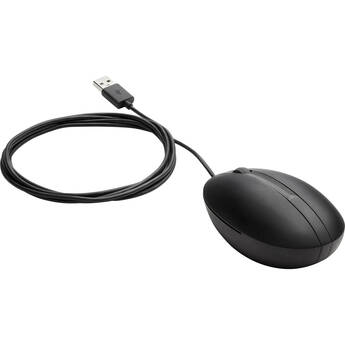
HP 320M Wired Desktop Mouse
- Wired USB-A Connection
- 1200 dpi Red Optical Sensor
- Ambidextrous Design
- Plug and Play for Windows and macOS
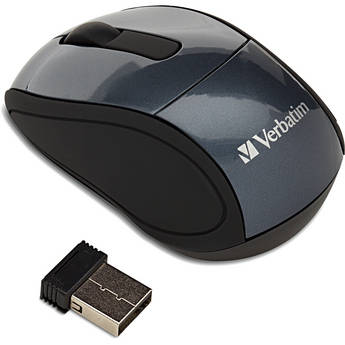
Verbatim Wireless Mini Travel Mouse - Graphite
- Optical Tracking
- 2.4 GHz Wireless
- USB Nano Receiver
- Ultra-Portable Design
Satechi C1 USB Type-C Wired Mouse
- Wired USB Type-C Connection
- Scroll Wheel
- Adjustable dpi Button
- Ambidextrous Design
Logitech M310 Wireless Mouse (Silver)
- 2.4 GHz Wireless Connectivity
- 1000 dpi Optical Sensor
- Ambidextrous Design
- USB Nano Receiver
Logitech M325S Wireless Mouse (Black)
- 2.4 GHz RF Wireless Connectivity
- 1000 dpi Optical Sensor
- Five Programmable Buttons
- Tilt Scroll Function
Logitech M310 Wireless Mouse (Glossy Red)
- 2.4 GHz Wireless Connectivity
- 1000 dpi Optical Sensor
- Ambidextrous Design
- USB Nano Receiver
Satechi Slim LX USB-C Wired Mouse (Silver)
- Wired USB-C Connection
- Integrated USB-A Adapter
- Anodized Aluminum Design
- Metal Scroll Wheel
Satechi Slim LX USB-C Wired Mouse (Space Black)
- Wired USB-C Connection
- Integrated USB-A Adapter
- Anodized Aluminum Design
- Metal Scroll Wheel
Matias Wireless USB-C Mouse (Black)
- Wireless Connectivity
- Scroll Wheel
- 4-Button Design
- USB-C Nano Receiver
Logitech POP Silent Wireless Bluetooth Mouse (Mist)
- Bluetooth 5.1 LE Connectivity
- 4000 dpi Optical Sensor
- 4 x Buttons
- SilentTouch Technology
Satechi M1 Wireless Mouse (Blue)
- Bluetooth 4.0 Wireless Connection
- Wireless Range of up to 32'
- Rechargeable USB Type-C Port
- Ergonomic Design
Logitech POP Silent Wireless Bluetooth Mouse (Heartbreaker Rose)
- Bluetooth 5.1 LE Connectivity
- 4000 dpi Optical Sensor
- 4 x Buttons
- SilentTouch Technology
Satechi M1 Wireless Mouse (Space Gray)
- Bluetooth 4.0 Wireless Connection
- Wireless Range of up to 32'
- Rechargeable USB Type-C Port
- Ergonomic Design
Dell MS5120W Pro Plus Wireless Mouse (Gray)
- 2.4 GHz RF | Bluetooth 5.0 Connection
- 4000 dpi Optical Sensor
- Seven Programmable Buttons
- Up to 36-Month Battery Life
Kensington Pro Fit Ergo TB450 Trackball Mouse
- Ergonomic Design
- USB, 2.4 GHz RF & Bluetooth Connectivity
- 1600 dpi Optical Sensor
- 5 Programmable Buttons
Adesso iMouse A20 Antimicrobial Wireless Vertical Mouse
- 2.4 GHz Wireless Technology
- Ergonomic Vertical Shape
- Preset Adjustable dpi Settings
- Constructed from Antimicrobial Materials
HP 435 Multi-Device Wireless Mouse
- 2.4 GHz Wireless | Bluetooth 5.2
- Up to 4000 dpi Multi-Surface Tracking
- Four Programmable Buttons
- Forward and Back Side Buttons
Logitech Signature Comfort M840 L Wireless Mouse (Off-White)
- Bluetooth 5.2 LE Connection
- 4000 dpi Optical Sensor
- 6 x Customizable Buttons
- Side Grips
Kensington Pro Fit Ergo Vertical Wireless Mouse (Gray)
- Wireless 2.4 GHz Connectivity
- 800/1000/1200/1600 dpi
- Contoured, Natural 46.7° Slope
- 1 x AA Battery Powered
Lenovo Go USB-C Wireless Mouse (Storm Gray)
- 2.4 GHz Wireless Signal
- Five Mouse Buttons
- Blue Optical Sensor
- Up to 2400 dpi
Lenovo Legion M410 Wireless Mouse
- 5.9' Wired | 2.4 GHz RF Wireless
- 16,000 dpi Optical Sensor
- 6 Programmable Buttons
- 1000 Hz Polling Rate
ASUS MD100 Marshmallow Wireless Mouse (Oat Milk)
- 2.4 GHz and Bluetooth 5.0 Connectivity
- 1600 dpi Optical Sensor
- Two Buttons
- Silent Switches
Logitech G G305 LIGHTSPEED Wireless Mouse (White)
- RF Wireless Connection
- 12,000 dpi Optical Hero Sensor
- Six Programmable Buttons
- 1000Hz Polling Rate
Logitech G G403 HERO Gaming Mouse
- Wired USB Connectivity
- 100 to 25,600 dpi HERO Sensor
- 6 Programmable Buttons
- 1000 Hz Report Rate
Logitech G G502 LIGHTSPEED Gaming Mouse
- Wireless 2.4 GHz Connectivity
- 25,600 dpi HERO Sensor
- 11 Programmable Buttons
- LIGHTSYNC RGB Lighting
Evoluent VerticalMouse D Wireless Mouse (Medium, Dark Silver)
- Wireless Connection with USB Receiver
- Laser Sensor with Adjustable dpi
- Adjustable Pointer Speeds
- Pointer Speed LED Indicator
X-keys L-Trac Trackball (Blue/Black)
- Laser Navigation Technology
- Adjustable Resolution: 1600/800/400 dpi
- Scroll Wheel
- Three Buttons
Logitech G G502 X Plus LIGHTSPEED Wireless RGB Mouse & POWERPLAY 2 Charging Pad Kit (Black)
- Wireless LIGHTSPEED Connectivity
- Gaming Mouse Pad with Wireless Charging
- 25,600 dpi HERO 25K Optical Sensor
- 13 Programmable Controls
Touchpads, Wireless Mice, USB-C Mice, and More
Mice or tracking pads are important parts of computer setups. Depending on computer use, most people need advanced options, such as USB-C mice, to carry out various tasks. These tasks relate to graphics design, gaming, business, and more. For all computer tasks, choosing the right mouse gives you a comfortable experience over extended periods.
Options for Mice and Touchpads
Computer mice are necessary for casual computer browsing and most other tasks. Dedicated gaming mice are ideal for playing video games on computers. Some gamers use controllers, and these devices create a console gaming experience. Most laptops come equipped with trackpads by default, but you can also get external ones for use with any computer. Trackballs use rotating balls for more comfortable scrolling.
Using Different Interfaces for Mice and Touchpads
You can connect your computer mouse and touchpad in a number of different ways. A USB-C mouse features a fast connection, quick response time, and increased durability. A USB wireless mouse eliminates the need for cords and cables, giving you more freedom as you scroll. To get the best of both worlds, USB-C wireless mice are also available. Instead of connecting via a wireless USB dongle, you can use a Bluetooth mouse to connect directly to your computer's built-in Bluetooth receiver. PS-2 is another type of connection that you can use for your mouse, and it's similar to normal USB connections.
Choosing the Right Tracking Type
Both laser and optical tracking types use light to detect movement in the mouse. For best results, you'll need mouse pads to provide a clear tracking surface for these mice. However, with trackballs, you won't need a mouse pad. Sensors within the trackball trace movement, and the case itself doesn't move. You can also use mice with Bluetrack technology on virtually any surface, whether wood, plastic, or granite countertop. If you want to use your mouse on glass or mirror surfaces, mice with Darkfield tracking technology are ideal and most suitable.
Check out B&H Photo and Video for a wide selection of mice and trackpads, including ergonomic Bluetooth mice, trackballs, USB-C mice, and much more.