Mice & Touchpads

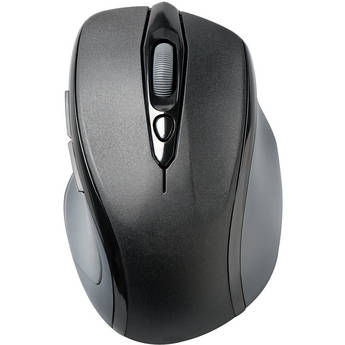
Kensington Pro Fit Mid-Size Wireless Mouse (Black)
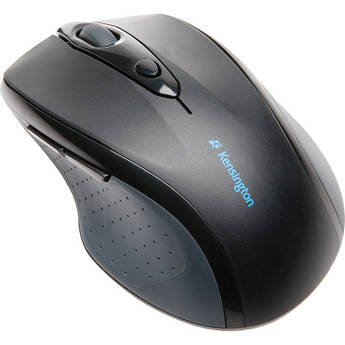
Kensington Pro Fit Full-Size Wireless Mouse (Black)
- 2.4 GHz Wireless
- Optical Tracking
- Right-Handed Shape
- Soft Rubber Grip
ZAGG Education Wired USB-C Mouse for Students
- Wired USB-C Connection
- Capacitive Touch
- Designed for Students
- Plug-and-Play
Kensington Pro Fit Wireless Mid-Size Mouse (Gray)
- 2.4 GHz Wireless Connectivity
- 1750 dpi Optical Sensor
- USB Receiver
- Scroll Wheel
Logitech Design Collection Limited Edition Wireless Mouse (Light Lilac)
- RF Wireless Connection
- 1000 dpi Optical Sensor
- Three Buttons
- Up to 12 Months of Battery Life
Logitech Design Collection Limited Edition Wireless Mouse (Misty Garden)
- RF Wireless Connection
- 1000 dpi Optical Sensor
- Three Buttons
- Up to 12 Months of Battery Life
Logitech M330 Silent Wireless Mouse (Gray/Yellow)
- 2.4 GHz Wireless Connectivity
- 1000 dpi Optical Sensor
- Right-Handed Design
- Quiet Buttons & Scroll Wheel
Lenovo Yoga Wireless Silent Mouse (Tidal Teal)
- Multi-Point Bluetooth 5.3 Connectivity
- 4000 dpi Laser Sensor
- Six Buttons
- Multiple Programmable Buttons
Logitech Pebble 2 M350S Wireless Mouse (Tonal White)
- Bluetooth LE & Logi Bolt Connectivity
- 400 to 4000 dpi Optical Sensor
- 3 x Buttons
- Up to 24-Month Battery Life
Verbatim Multi-Device Wireless Rechargeable Optical Mouse (Black)
- Bluetooth 5.0 & 2.4 GHz Connectivity
- Rechargeable Battery
- Connects to 3 Devices
- Contoured Design
CHERRY Wireless Mouse
- RF Wireless Connection
- 1750 dpi Optical Sensor
- Five Mouse Buttons
- USB Receiver
Kensington Pro Fit Ergo Wired Mouse
Lenovo Yoga Wireless Silent Mouse (Cosmic Blue)
- Multi-Point Bluetooth 5.3 Connectivity
- 4000 dpi Laser Sensor
- Six Buttons
- Multiple Programmable Buttons
Lenovo Yoga Wireless Silent Mouse (Luna Gray)
- Multi-Point Bluetooth 5.3 Connectivity
- 4000 dpi Laser Sensor
- Six Buttons
- Multiple Programmable Buttons
HYPER HyperSpace Wireless Bluetooth Mouse
- Bluetooth 5.0 Wireless Connection
- 5 x Customizable Buttons
- 1000 to 2400 DPI Optical Sensor
- Three Device Pairing
Matias Wireless USB-C Mouse (White)
- Wireless Connectivity
- Scroll Wheel
- 4-Button Design
- USB-C Nano Receiver
Satechi Slim EX Wireless Mouse (Silver)
- Bluetooth 5.3 & 2.4 GHz RF Connectivity
- 1200 dpi Optical Sensor
- Three Programmable Buttons
- Rechargeable 500 mAh Battery via USB-C
Satechi Slim EX Wireless Mouse (Space Black)
- Bluetooth 5.3 & 2.4 GHz RF Connectivity
- 1200 dpi Optical Sensor
- Three Programmable Buttons
- Rechargeable 500 mAh Battery via USB-C
Logitech POP Silent Wireless Bluetooth Mouse (Heartbreaker Rose)
- Bluetooth 5.1 LE Connectivity
- 4000 dpi Optical Sensor
- 4 x Buttons
- SilentTouch Technology
Macally USB Type-C Optical Silent Click Mouse (White with Silver Trim)
- 5' USB Type-C Cable Connection
- 2400 dpi Optical Sensor
- Soft-Click Buttons
- Ambidextrous Hand Design
HP 405 Quiet Wireless Mouse
- 2.4 GHz Wireless Connection | Bluetooth
- Up to 6000 dpi Multi-Surface Tracking
- Made with Durable Liquid Silicone Rubber
- Center Button Accesses Microsoft Wheel
HP 425 Programmable Wireless Mouse
- Bluetooth 5.3 Multi-Device Connectivity
- Up to 4000 dpi Multi-Surface Sensor
- Seven Buttons (Six Programmable)
- Forward and Back Side Buttons
Kensington Pro Fit Ergo TB450 Trackball Mouse (White)
- 2.4 GHz RF & Bluetooth LE Connectivity
- 1600 dpi Optical Sensor
- Five Programmable Buttons
- 34mm Trackball
Adesso iMouse T30 Wireless Programmable Trackball Mouse (Black)
- 2.4 GHz Wireless Technology
- Ergonomic Design
- 1.25" Detachable Trackball
- Internal Optical Sensor
Logitech G G203 Lightsync Mouse White
- 6.89' Wired USB Connection
- 200-8000 dpi Laser Sensor
- Six Programmable Buttons
- 1000Hz Ultrapolling
Kensington Pro Fit Ergo Wireless Mouse (Black)
- 2.4 GHz & Bluetooth Connectivity
- 800/1200/1600 dpi
- Quiet Clicking
- 1 x AA Battery Powered
CHERRY MW 9100 Rechargeable Wireless Mouse
- 2.4 GHz RF & Bluetooth 4.2 Connectivity
- 2400 dpi Optical Sensor
- Six Programmable Buttons
- Rechargeable Lithium-Ion Battery
AZIO IZO Wireless Mouse (White Blossom)
- 2.4 GHz RF Wireless & Bluetooth 5.0
- PixArt PAW3212 Optical Sensor
- Three Mouse Buttons
- Ambidextrous Design
Touchpads, Wireless Mice, USB-C Mice, and More
Mice or tracking pads are important parts of computer setups. Depending on computer use, most people need advanced options, such as USB-C mice, to carry out various tasks. These tasks relate to graphics design, gaming, business, and more. For all computer tasks, choosing the right mouse gives you a comfortable experience over extended periods.
Options for Mice and Touchpads
Computer mice are necessary for casual computer browsing and most other tasks. Dedicated gaming mice are ideal for playing video games on computers. Some gamers use controllers, and these devices create a console gaming experience. Most laptops come equipped with trackpads by default, but you can also get external ones for use with any computer. Trackballs use rotating balls for more comfortable scrolling.
Using Different Interfaces for Mice and Touchpads
You can connect your computer mouse and touchpad in a number of different ways. A USB-C mouse features a fast connection, quick response time, and increased durability. A USB wireless mouse eliminates the need for cords and cables, giving you more freedom as you scroll. To get the best of both worlds, USB-C wireless mice are also available. Instead of connecting via a wireless USB dongle, you can use a Bluetooth mouse to connect directly to your computer's built-in Bluetooth receiver. PS-2 is another type of connection that you can use for your mouse, and it's similar to normal USB connections.
Choosing the Right Tracking Type
Both laser and optical tracking types use light to detect movement in the mouse. For best results, you'll need mouse pads to provide a clear tracking surface for these mice. However, with trackballs, you won't need a mouse pad. Sensors within the trackball trace movement, and the case itself doesn't move. You can also use mice with Bluetrack technology on virtually any surface, whether wood, plastic, or granite countertop. If you want to use your mouse on glass or mirror surfaces, mice with Darkfield tracking technology are ideal and most suitable.
Check out B&H Photo and Video for a wide selection of mice and trackpads, including ergonomic Bluetooth mice, trackballs, USB-C mice, and much more.