
Obtaining the essentials for your video podcast is important, but as you are checking off your list of items you need, you might end up forgetting some items. Did you consider cables? Maybe mic arms and shock mounts? What about a backdrop? Well, luckily for you, we are going over some of the top accessories you may need for your video podcast with a few examples to help inspire you. So, let’s take a look at a few examples of what you need before you hit the record button.
Lighting
For large, in-person setups, lighting is key. You want something that is suited for showcasing your environment rather than just your face. Devices like ring lights are good for close and intimate shots, but not great for set dressing.

Most lighting panels are equipped with LEDs, which can provide intense brightness levels that can cover a wide area. You want to look at lighting panels that offer bright output with a wide color temperature range. The 800D-RGB from GVM is a great 3-light kit that provides you with ample coverage and solid performance suitable for your video podcast. If you need something bigger and more robust, GVM also offers a 1200D RGB LED 3-light kit that expands light coverage even further!
Creative Console
If you are looking to take your production to the next level, I would suggest a solid creative console or interface. We broke down a few of our favorite creative consoles, but generally speaking, creative consoles are great tools to help streamline your setup with ease. They tend to work with all sorts of streaming and broadcasting software applications, giving you total control over your content.

The Elgato Stream Deck+ still lives on as one of the best consoles out there. Whether you are livestreaming your podcast, recording it, or just looking for ways to control your entire system, the Stream Deck+ is by far one of the best out there! Additionally, it comes preinstalled with ten popular key configurations and works seamlessly with all other Elgato products, so you’ll be set right out of the box!

The Logitech MX Creative Console is a great alternative with native support for programs like the Adobe suite. It offers multiple customizable LCD keys as well as a secondary panel that features a rotating knob, roller, and additional buttons for precision control over various functions like zoom, panning, and more.
Capture Cards
Capture cards can dramatically change your presentation. There are multiple versions of these cards, some of which can capture external video footage to be inserted into your podcast stream. These are great if you have a guest who wants to show a clip from one of their projects or display artwork directly from another device.
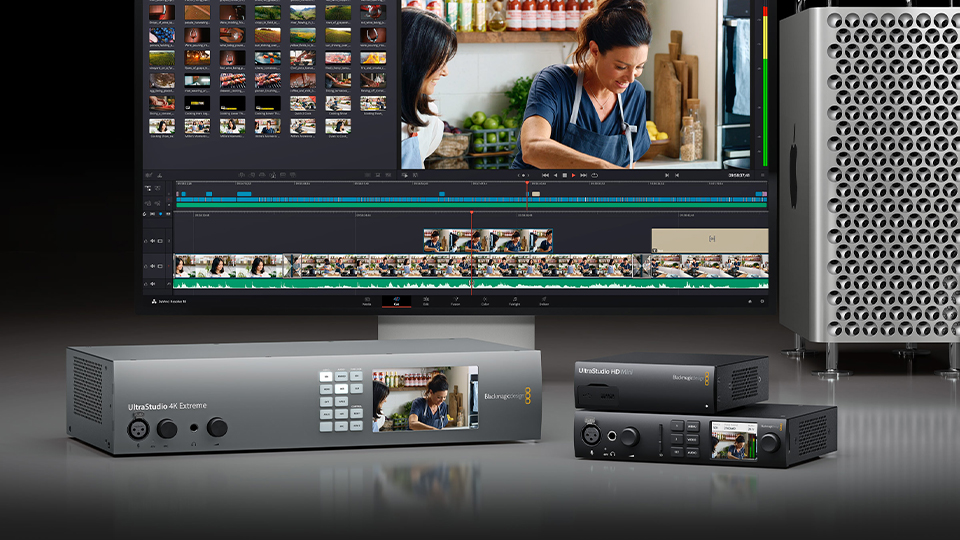
Capture cards should be purchased in accordance with the rest of your equipment. Devices like the Blackmagic Design UltraStudio HD Mini is great when used with cameras using an SDI connection. Otherwise, Blackmagic Design’s DeckLink 8K G2 can be installed directly into your computer and provides you with enhanced controls directly from your computer. But you might need something a bit more robust, and for that we can suggest dedicated switchers.
Switchers
If you are looking for something more advanced than a creative console and capture card, there are dedicated livestream switchers. Despite the nomenclature, you can easily use these with recording applications as well. Essentially, they allow you to quickly switch cameras and inputs with the press of a button. They also offer a ton of other features and functions like zoom, picture-in-picture, transition duration, effects, and a whole lot more.

Once again, Blackmagic Design is in the frame with their ATEM Mini Pro live stream switcher, which uses multiple HDMI inputs to capture and quickly swap between cameras. It also performs all the actions we previously mentioned. There is also the RODE RODECaster video production console, which offers a ton of features in a small footprint.
Tripods
Speaking of cameras, one or more tripods are essential. You have a camera, and you want something to hold it steady, and this is where a good tripod comes into play. There are multiple tiers of tripods, but for a show that has static camera placements, any tripod that features solid footing will do the trick.

Depending on the gear you are using, tripods like the Magnus TR-13 are a great option! It has everything you need and if you are recording at a different location or need to break down your setup quickly, the TR-13 is great for just that. There is also the Neewer TP62, which is constructed with lightweight and durable carbon fiber and has a built in leveler so you know how and where to make adjustments.
Mic Arms and Mounts
Some microphones include stands or arms, but most do not. So, you’ll need a stand that can best accommodate your setup. In some cases, you could get a standard high-profile scissor arm that clamps to the edge of a desk, but because the arms are high, it could block sight lines to your guests. If that isn’t a problem, we suggest an arm like the RODE PSA1+, which is a solid studio arm that can keep your cables organized.

Low-profile arms have become more popular because they keep the mics close without getting in the way. Arms like the Elgato Wave Mic Arm LP is a great low-profile solution. It is relatively close to the desktop and has a wide range of movement while keeping the mic in the ideal vocal range.

You’ll also want a solid mount. Shock mounts that use a mix of metal grips and bands prevent sound from traveling into the microphone’s diaphragm and disrupting your audio. In most cases, I would openly suggest a few, but because they are dependent on the type of mic you have, all I can suggest is checking compatibility between the two devices. There are a few universal mounts, but those are few and far between.
Backdrop
There are many different options out there when it comes to backdrops. You can either go with a canvas one like the Wescott X-Drop Canvas Backdrop, which has a static image, or a green screen like the Impact Collapsible Background, which can throw you right into a digital landscape.

Cables
Last but not least, you may need some cables! Most USB equipment includes a cable, but if it isn’t long enough, I suggest a longer cable. In some cases, which might not be possible as technologies like Thunderbolt have a max usability range. But, if you are looking for something like XLR cables, then you can go with whatever works for your budget, just make sure you have ample slack. If you are an organizer like I am, I found the Kopul Premium Performance 3000 Series Neutrik XLR cables to be perfect! There are tons of colors and lengths that make my podcast area easy to set up and keep tidy.

Conclusion
There are many tools and devices out there that can help you bring your podcast from an idea to a fully realized show. Hopefully the equipment here inspires you to find what it is you are looking for. Of course, for additional information about each of these products, make sure you hit the links. Hopefully, if none of these item’s appeal to you, we have at least inspired you and given you enough guidance to find exactly what you are looking for.
