
Portable digital audio recorders and their built-in microphones have made it easier for everyone to capture high-quality audio. Ambient sounds, podcasting, and live music are obvious uses for these highly capable devices, but one of the most significant areas for portable digital recorders is in film and video production. The past decade has brought a wave of affordable camera systems that can shoot cinema-quality Full HD and 4K video. Unfortunately, the built-in pre-amps and microphones of these cameras are usually lacking. A good solution for this is to add a lavalier microphone and portable digital recorder to your kit. It is one of the simplest and most effective ways to get the professional sound that you want.
Highlighting the lavalier is a considered decision, because the other mics commonly used in film and video production have much different uses and tips for operation. Shotguns are extremely common, but need to be used with a boompole for the best sound quality—there are also on-camera shotgun mics, such as the RØDE VideoMic that are excellent, as well. Handheld mics have a much different aesthetic and are great for on-camera interviews or presenters who may need more control over mic position.

The lovely lavalier works for many similar situations, or even as a backup, thanks to its extraordinarily small size and ease of use. You can hide these under clothing easily or simply in a less conspicuous manner while still capturing great audio from a subject. When combined with a portable recorder, this entire audio setup becomes an impressive piece of effective kit. Lavaliers are also a great pick for vlogging and other creators who need to mic themselves up quickly and don’t have the benefit of a crew to attend to different options.
The Different Recorders
One thing that isn’t lacking is the variety of digital audio recorders. Nowadays, if you browse the B&H website, you can find models with tons of XLR inputs alongside color screens and plenty of knobs and buttons, or you could go check out ultra-compact options that have a couple of built-in mics and a single 3.5mm input—we haven’t even started talking about all the different shapes on the market. I am going to focus on the more portable recorders available, because they make the most sense if you want to use them with lavaliers.
At the bare minimum, you will need an audio recorder with a single input and some degree of manual control or functions. What type of input, you ask? Well, there are two main ones: the pro-grade XLR and the simpler 3.5mm, also known as 1/8" or miniphone. The easiest place to start is the 3.5mm connection, since this is available on practically all recorders, is common for lavaliers, thanks to its size, and can even be adapted to work with smartphones. Going this route is also the most affordable, and one of the most popular is the Zoom H1n. This lightweight recorder has its own set of stereo mics and a 3.5mm mic input with plug-in power, which is very important for many lavaliers. Its small size and simple controls make it easy to set up and then pocket.

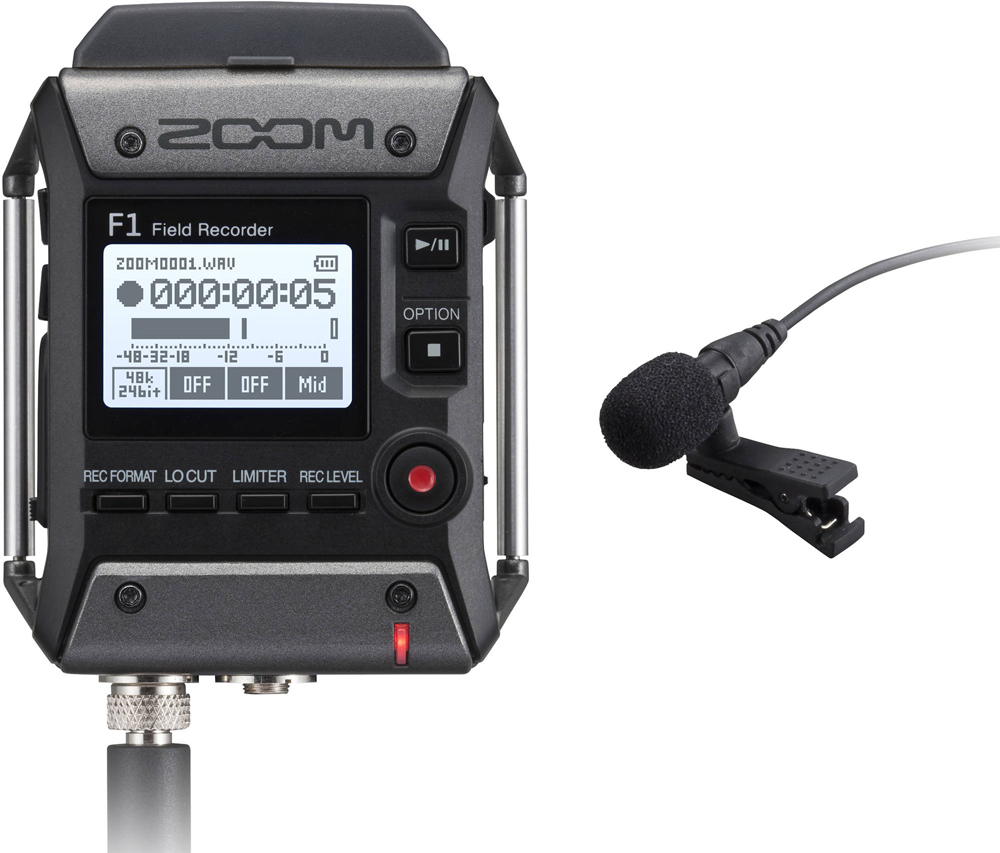
Manufacturers have made some moves in digital recorders, coming up with more specialized tools. A great option for lavaliers is the Tascam DR-10L, which is designed from the ground up to be a belt pack recorder. It is very small and clips right onto a belt or waistband, making it easy to hide. Making life even better are a few functions that guarantee good recordings. This is the limiter to avoid clipping loud sounds, an auto-level setting, and the ability to record a safety track at a lower level. It doesn’t have any built-in mics like other recorders, but the included lavalier and wide compatibility through its 3.5mm input with plug-in power make the DR-10L among the best recorder options for lavs. If you want something more versatile, I would say check out the Zoom F1, a recorder I reviewed and found to be excellent.

You aren’t limited to just smaller recorders; you could go with a Zoom H5 or Tascam DR-40X if you can find a way to hide it on your subject’s person. If you don’t need to hide it, or want to wire it to a place where you or your crew can monitor the sound, you could upgrade to even bigger setups, including the Sound Devices MixPre-3 or Zoom F6. These can be great if you need to record multiple people simultaneously, because they have more inputs available. The addition of XLR inputs also means access to more microphones, and the professional-grade connector is generally more reliable.

Finding a Lavalier
Choosing a lavalier can be difficult. I know, I’ve had to do it. They all look similar and there usually aren’t too many distinguishing features. There can be a huge range of prices. Honestly, you are probably fine with whatever lavalier fits within your budget. While getting good audio is partially a measure of the mic’s quality, a lot of it has to do with technique and placement. In other words, you should be able to get good audio with any quality mic and you don’t have to break the bank.
Critical to picking a lavalier is compatibility. Certain brands and transmitters have slightly different connectors, which can cause the mic not to fit all recorders perfectly. An example is the extremely popular Sennheiser ME 2-II Omnidirectional Lavalier Microphone. It features a locking 3.5mm connector that works wonderfully with Sennheiser transmitters and numerous other related devices, but there is the potential of having the locking mechanism prevent a secure connection with select recorders based on the design. In this case, you may be better served with a more universal 3.5mm connector, such as that found on the RØDE Lavalier GO. And, if you want to go budget, you shouldn’t be afraid of the Polsen OLM-10.

Going up a level, you will encounter lavaliers with XLR connectors. This bulkier connection is the standard in the audio world and, if you are looking for a professional audio recorder, you will likely have a few of these inputs to work with. There are plenty of high-end lavaliers sporting XLR with a relatively affordable option being the Audio-Technica AT899. This offers a compact, relatively versatile design with good audio quality. Going for alternatives there are plenty out there. One to check out is the Tram TR50 because its flat, square shape makes it easy to hide on your subject, which can be very helpful to certain shoots.

Moving up the line, there is the Countryman B6, which is exceptionally small, measuring only 1/10 inch in diameter. This is a great mic for hiding while still getting high-quality sound. Or, if you want the best possible audio quality, the mic that is most recommended for pro applications is the Sanken COS-11D. This lavalier is available in a ton of varieties as well, making it easy to find one that works perfectly for your needs.

Putting the Two Together
It’s as simple as plugging the lav into the recorder. For 3.5mm mics this could mean the attached cable goes directly into the audio recorder’s input, and that’s that. XLR can work the same way, though some may require a separate XLR cable to make the actual connection. Then there is wireless, which is a whole other thing I will get to a bit later. Once the connection is made it is now about setup.

Wiring someone with a lavalier can be intimidating. Generally, you will want to hide the wire under clothes and perhaps place it in more delicate locations. Just act professional and always ask for permission if you ever need to touch your subject. If you ever need to adjust anything or need to fix a cable setup you should just ask the talent for permission. Sometimes they may be able to and want to take care of it themselves. Most individuals who are on camera often will understand and have no problems with you getting it set up. New or infrequent actors may not be as comfortable with it. Always ask, it should be your default.
As for placement, you will want to get the mic as close as possible to your subject’s mouth, which makes sense—the same technique works with nearly every mic and is no different here. If you don’t need to have the mic 100% out of sight, it is relatively easy: a shirt collar is usually the go-to spot. Feel free to get creative here if you wish; you can also get the mic up on a hat, positioned in hair, or secured with alternative clip types. The best practice is to center the mic on their person, though the omnidirectional pickup pattern of most lavs will help capture consistent audio even if you are forced to position the mic is a less than ideal location.
After it is attached, you will want to make sure that you don’t have any interference from pulling on the cable. Securing the cable with a loop using gaffer tape on clothing or using surgical tape or skin-safe tape for use directly on the talent will relieve strain on the cable and reduce or eliminate cable noise. Helpful for hiding mics under clothing are a series of options from Rycote, called Stickies, Overcovers, and Undercovers. Stickies are simply used for taping the mic to clothing or skin. Combine this with Overcovers to protect the mic from wind and contact noise from clothing. Undercovers are very similar but are designed solely for placing mics under clothing.

Recorders introduce another issue with setup. Some feature belt clips, which makes hiding them and positioning them very easy. Others are optimized for handheld use and, if you need it on the talent, you will need to be creative. One option for lighter recorders is to use surgical gauze to create a tight belt underneath clothing to hold the recorder. Some recorders may just slip into a pocket. Depending on the size and weight of the recorder, you may have to think hard to make it work. Another option is to set up a longer cable and then you have the recorder away from your talent, ideally being monitored by a sound professional or you.
Using the Recorder
With all that taken care of, now it is time to set levels (ideally between -12 and -6 dB) and hit Record. I should mention the benefits of using a recorder instead of going directly into camera with your lavaliers—namely, the quality of the recording. Digital audio recorders offer advanced controls and features that will benefit your recordings. The first step is the use of higher-quality pre-amps compared to those built into your camera. This ensures cleaner recordings and the ability to push the gain a bit if you need a louder signal. You should also have the ability to set the file type, bit depth, and sampling rate for the highest-quality files.
Now for the fun stuff—all the other functions loaded into them. One very common one, especially if you decide to keep the recorder on your talent and you can’t actively monitor it, is a limiter. This will help avoid distortion in the event that the levels start to peak. Distortion with digital recording is bad, so anything that can prevent it is good. However, the limiter can raise the noise floor. Another option is a safety track, meaning the recorder will save a second track at a lower level. It’s another way to avoid peaking and ruining your take.
Yet another feature is a low cut filter. This will eliminate sound at particular frequencies and can sometimes be set to specific maximum frequencies. By cutting these lower frequencies, you can eliminate some unwanted room noise and rumbles that would otherwise show up in your recording. It isn’t always needed or beneficial, so be careful. This leads me to my final point. Get some good headphones to monitor your sound always. Even if you won’t have the opportunity to monitor throughout the recording, it can help you get things set up.

This technique, referred to as dual-system sound, will require syncing in post because the files from your recorder are not directly connected to the video you record. Nowadays, most NLEs, including Adobe Premiere Pro and Blackmagic DaVinci Resolve, have some automated syncing options. By using a slate or even just a clap, you should have good luck with these functions. The best practice is to use a slate, which gives a visual indication and a distinct mark on your sound file that you can sync up manually when needed.
A Look at Wireless
Wireless mic systems are nowhere near as costly or difficult as they once were, with many newcomers popping onto the scene to make them available to more filmmakers. Tons of different frequencies, connectors, and systems can make this a very confusing arena for newcomers, many just opting for brands or systems they are vaguely familiar with and sticking to them. Advanced systems, such as the Sennheiser EW Series, use specialized frequencies that avoid interference from more popular bands, making them the most reliable options available, as well as the priciest. There are also more affordable takes specific to on-camera use, including the Sennheiser AVX System. There is too much to know about wireless system to truly cover them here, and this article is focused on getting you hooked up to a recorder and rolling, which brings me to what I like to refer to as cable-replacement solutions.

Arguably started with the launch of the Sennheiser XSW-D, or XS Wireless Digital, System, these new wireless options are meant to be dead simple and simple make a wireless connection between your mic and recorder. Using the more commercialized 2.4GHz frequency—meaning a greater chance of interference in busy locations, unfortunately—these relatively affordable and simplistic systems will help you meet your wireless goals. I like Sennheiser’s system because it allows you to mix and match connectors as needed. You can have a 3.5mm transmitter with an XLR receiver, a ¼" transmitter with a 3.5mm receiver, and any other combination of the three main connectors as you please. Just plug them in and turn them on to create a wireless system with nearly any mic and recorder.

Another option is the RØDE Wireless GO. This system stands out because it has an integrated microphone and a 3.5mm input. Put this directly on the talent with no wires and then keep the receiver back with you and the recorder and you are good to go, though I would recommend using a true lavalier for optimal quality. Both the RØDE and Sennheiser systems have the benefit of being extremely compact. So, if you are looking to hide mics, opting for a wireless setup may be your best approach.

Hopefully, this gives you all the information you need to start rolling on your next shoot and have some confidence in how you have your audio equipment set up. If you want to know more, the Audio for Video series on the B&H YouTube Channel is an amazing resource. Any questions or comments? Feel free to leave them below.
