
Sony Global
Memory Card Readers

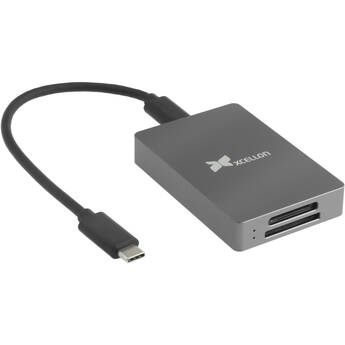
Xcellon CFexpress Type A and UHS-II SD Card Reader
- CFexpress Type A Card Slot
- UHS-II SD Card Slot
- 10 Gb/s USB-C 3.2 Gen 2 Interface
- Plug-and-Play

Xcellon CFexpress Type B and UHS-II SD Card Reader
- CFexpress Type B Card Slot
- UHS-II SD Card Slot
- 10 Gb/s USB-C 3.2 Gen 2 Interface
- Plug-and-Play
Xcellon CR-M5 USB-C SD UHS-II Card Reader
- 1 x UHS-II SD/SDHC/SDXC Card Slot
- Integrated USB-C 3.2 Gen 1 Cable (7.9")
- Plug-and-Play
- Bus Power
ProGrade Digital CFexpress Type B & UHS-II SDXC Dual-Slot USB 3.2 Gen 2 Card Reader
- 1 x CFexpress Type B Card Slot
- 1 x UHS-II SDXC Card Slot
- 10 Gb/s USB-C 3.2 Gen 2 Interface
- Data Transfer Speeds up to 1.25 GB/s
Xcellon Dual USB 3.2 Gen 1 Card Reader
- 1 x USB-C Interface
- 1 x USB-A Interface
- 1 x UHS-I SDXC Card Reader
- 1 x UHS-I microSDXC Card Reader
SanDisk Extreme Pro SD Card USB Type-C Reader
- USB Type-C 3.0 Interface
- Compatible with SDHC & SDXC Cards
- Up to 500 MB/s Data Transfer Rates
Sony MRW-G3 CFexpress Type A Card Reader
- 1 x CFexpress 4.0 Type A Card Slot
- 1 x 40 Gb/s USB-C Port (USB4)
- Heat Dissipating Enclosure
- Includes USB-C to USB-C Cable
Lexar Professional CFexpress Type B/SD USB 3.2 Gen 2 Card Reader
- For Photo and Video Professionals
- CFexpress Type B Card Slot
- UHS-II SDXC Card Slot
- 10 Gb/s USB-C 3.2 Gen 2 Interface
ProGrade Digital CFexpress Type A & UHS-II SDXC Dual-Slot USB 3.2 Gen 2 Card Reader
- 1 x CFexpress Type A Card Slot
- 1 x UHS-II SDXC Card Slot
- 10 Gb/s USB-C 3.2 Gen 2 Interface
- Data Transfer Speeds up to 1.25 GB/s
Apple USB-C to SD Card Reader
- Compatible with SD/SDHC/SDXC Cards
- Supports UHS-II Speeds
- Plug-and-Play
- Built-In USB-C Cable
Lexar Professional USB Type-C Dual-Slot Card Reader
- 1 x UHS-II SDXC Card Slot
- 1 x UHS-II microSDXC Card Slot
- USB 3.2 Gen 1 Type-C Interface
- Read Speeds up to 312 MB/s
Xcellon CFexpress Type B Card Reader
- CFexpress Type B Card Slot
- USB-C 3.2 Gen 2 Interface
- Plug-and-Play
- Bus Powered
Sony MRW-G1 CFexpress Type B/XQD Memory Card Reader
- For CFexpress Type B & XQD Cards
- USB 3.1 Gen 2 Interface
- Data Transfer Rate: Up to 10 Gb/s
- Includes USB Type-C and Type-A Cables
Xcellon CFexpress 4.0 Type B Card Reader
- 1 x CFexpress 4.0 Type B Card Slot
- 40 Gb/s USB-C Interface (USB4)
- Active Cooling with Internal Fan
- Passive Cooling via Aluminum Housing
ProGrade Digital CFexpress Type B USB4 Single-Slot Card Reader
- 1 x CFexpress 4.0 Type B Card Slot
- USB4 Interface (40 Gb/s)
- Data Transfer Speeds up to 5 GB/s
- LED Indicator
Sabrent USB 3.0 Type-A and Type-C OTG Card Reader
- 1 x USB 3.0 Type-A Port
- 1 x USB 3.0 Type-C Port
- 1 x UHS-I SDXC Card Slot
- 1 x UHS-I microSDXC Card Slot
Xcellon USB Multi-Card Reader
- Compatible with SD/SDHC/SDXC Cards
- Compatible with microSD/SDHC/SDXC Cards
- Compatible with CompactFlash Type I
- Supports UDMA 7 and UHS-II
SanDisk PRO-READER Multi Card Reader
- 1 x UHS-II SD Card Slot
- 1 x UHS-II microSD Card Slot
- 1 x CompactFlash Card Slot
- 5 Gb/s USB-C 3.2 Gen 1 Interface
OWC Atlas CFexpress 4.0 Type B Card Reader
- 1 x CFexpress 4.0 Type B Card Slot
- 40 Gb/s USB4 Interface
- Data Transfer Speeds up to 5000 MB/s
- Bus Power | Innergize Mode
Vidpro 6-Slot All-In-One USB 2.0 Card Reader
- Supports CompactFlash Media
- Supports Secure Digital Media
- Supports Memory Stick Media
- Supports MultiMediaCard Media
Lexar Professional Workflow CFexpress 4.0 Type B Card Reader
- 1 x CFexpress 4.0 Type B Card Slot
- 40 Gb/s USB-C Interface
- Works with Lexar Professional Workflow
- CFexpress 2.0 Type B Compatible
ProGrade Digital Dual-Slot UHS-II SDXC & microSDXC USB 3.2 Gen 1 Card Reader
- 1 x UHS-II SDXC Card Slot
- 1 x UHS-II microSDXC Card Slot
- USB 3.2 Gen 1 Type-C Interface (5 Gb/s)
- Bus Powered via USB
Lexar Professional Workflow CFexpress 4.0 Type A Card Reader
- 1 x CFexpress 4.0 Type A Card Slot
- 40 Gb/s USB-C Interface
- Works with Lexar Professional Workflow
- CFexpress 2.0 Type A Compatible
Lexar Professional Multi-Card 3-in-1 USB 3.0 Reader
- 1 x UHS-II SDXC Card Slot
- 1 x UHS-II microSDXC Card Slot
- 1 x UDMA 7 CompactFlash Card Slot
- USB-C 3.0 Interface
ProGrade Digital Dual-Slot UHS-II SDXC USB-C 3.2 Gen 2 Card Reader
- 2 x UHS-II SDXC Card Slots
- USB-C 3.2 Gen 2 Interface (10 Gb/s)
- Data Transfer Speeds up to 1.25 GB/s
- Use Both Card Slots Simultaneously
Transcend RDF9 UHS-II Card Reader
- Micro-USB 3.1 Gen 1 Interface
- Supports SD/SDHC/SDXC Cards
- Supports microSD/SDHC/SDXC Cards
- Supports CompactFlash Cards
Lexar Professional Workflow Dual-Slot UHS-II SD Card Reader
- Two UHS-II SDXC Card Slots
- 10 Gb/s USB-C 3.2 Gen 2 Interface
- Both Slots May Be Used Simultaneously
- Works with Lexar Professional Workflow
Lexar Professional CFexpress Type A / SD USB 3.2 Gen 2 Reader
- 1 x CFexpress Type A Card Slot
- 1 x SD Card Slot
- USB 3.2 Gen 2 Standard (10 Gb/s)
- USB Type-C Connection
Learning About Memory Card Readers (SD & Micro SD Card Readers)
Memory card readers provide a fast and convenient way to transfer data from digital storage devices such as Secure Digital (SD), CompactFlash (CF), or MultiMedia (MMC) cards to a computer, tablet, or dedicated backup device. This allows still or video photographers to edit their images and films, send them to end users via the internet, or archive them securely. They can also erase and reuse the cards if desired.
Types of Memory Card Readers
Memory card readers either come with an integrated plug for connection, or as a box with slots that take the cards, and with the connection plug on the end of a cable. Readers are available as single card readers, which can handle just one type of card, or multi-card readers. These vary from dual readers to models with multiple slots that can take almost all types of cards.
Most models are USB card readers. They connect to standard USB 2.0 ports, with many also compatible with the newer, faster, USB 3.0 standard. If you use an Apple computer, you’ll need a model with a compatible Lightning connector. This can be a dedicated model, or a card reader that features both USB and Apple connectivity.
How to Select Memory Card Readers
When choosing a memory card reader, ensure that it accepts the type of card you use regularly. There are over twenty different types of cards, with SD and microSD cards being the most popular. SD card readers can also work with microSD via a simple adapter.
The next consideration is whether to pick a compact model that takes just one type of card, such as a microSD card reader or CF card reader. These are a good solution if you only work with one card type. Investing in a universal card reader lets you handle cards from all devices, including mobile phones and other accessories.
Another key factor to look at is transfer speed. Class 10 SDHC cards are fine for general use. However, if you work with huge image files, or carry out 4K video recording, you’ll need a high-speed reader, which can work with models such as PRO CFast 2.0 memory cards from SanDisk.
What Accessories Work Well with Memory Card Readers?
Card readers are necessary to transfer and save your data, and for even more security and convenience, you have a choice of memory card back-up devices. Likewise, you can use memory card duplicators to make copies of your data for distribution or storage. Other key accessories are memory card cases that keep your cards safe and orderly.
Look for high-quality memory card and back-up accessories, including memory card cases, at B&H Photo and Video.