IPad

Apple revealed its latest entry into the iPad Air family, now with the powerful M4 silicon. Featuring more memory options, a faster GPU, and more, the iPad Air with M4 is up to 30% faster than the iPad Air with M3. N1 and C1X wireless technologies are also baked into the M4 iPad Air, along with support for Wi-Fi 7.
Apple 13" iPad Air with M4
At the heart of the iPad Air is the M4 chip, empowering users with greater
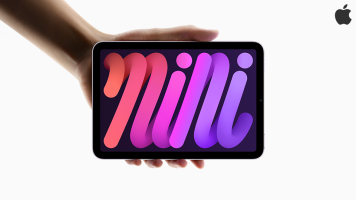
Apple announced its latest entry into their lightweight and versatile family of devices with the new iPad mini. Sporting an 8.3-inch Liquid Retina display and equipped with the latest A17 Pro chip, the iPad mini is ready for your media, games, and more. Designed for Apple Intelligence, the iPad mini gives users a unique, personalized experience with generative features that is equal parts helpful and secure.

Apple just announced that Final Cut Pro and Logic Pro will soon be available on your iPad. Both apps will be available via subscription for $4.99 a month or $49 a year. According to Apple, both apps should be in the App Store beginning Tuesday, May 23rd.
Final Cut Pro will be redesigned around the iPad, with touch-based interfaces and enhancements that Apple claims will make workflows even more intuitive for creators. A new jog wheel makes the

by Kar Wong ·Posted
With so many different variations available, choosing the best iPad can present its challenges. Whether you're talking about the basic iPad, the iPad mini, the iPad Air, or even the Pro, each model offers its own set of advantages and highlights. In this article, we'll suggest which iPads are best suited for specific users and applications, hopefully helping you choose the model that is right for you.
Best iPad Overall: iPad (2022)
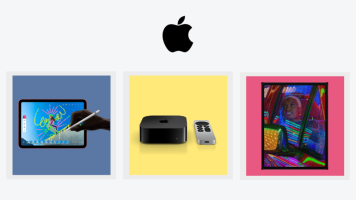
This week, Apple quietly announced a redesigned iPad, alongside an updated iPad Pro and Apple TV 4K. The new devices arrived without the usual fanfare and keynote that we've come to expect from the company. That's not to say that the updates
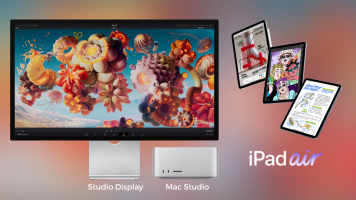
During Apple’s “Peek Performance” event, Tim Cook and company unveiled a treasure trove of new devices, including the insanely powerful Mac Studio and Studio Display, an upgraded iPad Air with Apple’s M1 chip, and some updated iPhone models, as well. Here’s everything that was everything at today’s product-packed showcase.
Mac Studio with M1 Max/M1 Ultra Chip
Arguably, the biggest reveal at today’s event was the introduction of the all-new Mac Studio and

Apple announced a ton of new software at this year’s WWDC keynote address, including a detailed preview of the next iPad operating system, iPadOS 15. Focusing heavily on productivity enhancements and better multitasking, iPadOS 15 promises to elevate the power and performance of your iPad with a bevy of helpful new features, updates, and enhancements. Here are the features we think will benefit users the most.

Create anywhere, any time, on any device with the latest Adobe products. At Adobe MAX 2019, the curtains have been lifted on the next generation of professional Creative Cloud, including the official release of Photoshop for iPad. Looking at the updates and releases, Adobe is putting an emphasis on being able to work on whatever device is most comfortable for you, and this includes being able to switch between a desktop, laptop, or even tablet if the situations call for it.

One of the most notable announcements from WWDC 2019, even including the reveal of the new Mac Pro, was the announcement of iOS 13 and iPadOS. Hear that? iPad is getting its own distinct operating system that will bring enhanced capabilities. What kind of changes, you ask? This overhaul will transform the iPad into its most powerful iteration yet, and iPadOS brings it one step closer to being a laptop replacement for many, including me.

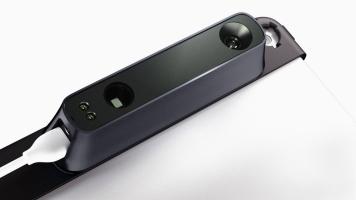
Take a different approach to your 3D scanning using the Occipital Structure Sensor 3D Scanner with Structure Sensor Bracket. Designed for on-the-go users who need a portable and handheld 3D scanner, Occipital’s offering comprises two main components. First is the Structure Sensor 3D Scanner, which performs 3D scans, captures augmented reality, and obtains measurements. Second is the Structure Sensor Bracket, which secures the scanner to your

1,611 Views ·Posted
In this B&H Event Space video, join photographer David Brommer as he shares mirrorless camera tips and elaborates on the mobility of his iPad-based workflow. Imagine the freedom of packing all your gear—including your digital darkroom—into a small shoulder bag to carry on your next trip. Brommer’s recommendations will help you trim your kit down to the essentials. Learn techniques to achieve better travel photographs, from researching your subject in advance to determining your shooting style and how you want to present the work. Discover

3,275 Views ·Posted
In the following video, Rob Rives demonstrates the QSC TouchMix–30 Pro Digital Mixer, and how it can be a useful addition to any band setup, rehearsal room, club, concert hall, house of worship, school, or broadcast studio. This video explores the functions, controls, and features of the TouchMix–30 Pro, including the large 10" multi-touch screen, anti-feedback and room-tuning wizards, two real-time analyzers (RTA), the patch matrix,

4,838 Views ·Posted
In the following video, Rob Rives demonstrates the Sennheiser ClipMic Digital and MKE2 Digital microphones for iOS, and how they can be a useful addition to any pro audio/video setup. This video explores the functions, controls, and features of both microphones, including Apogee’s Pure Digital preamp and audio converter, which plugs

3,265 Views ·Posted
In the following video, Rob Rives demonstrates the five new products from Shure’s MOTIV series, and how they can be implemented in a variety of recording applications. This video explores the functions, controls, and features of the MV5, MV51, MVi, MV88 and MVL, including the ShurePlus MOTIV application, which allows control over the microphones from any iOS device. The video showcases the sound quality of each mic and demonstrates how simple they are to set up and use